
The best Sony Creators' App alternative for delivering every shot
If you want every frame from your Sony Alpha on your phone and delivered to your own Dropbox, Google Drive, client gallery or FTP server while you shoot, the best Creators' App alternative is a tethering app that copies each full-resolution ARW or JPEG off the camera automatically. CloudTether does that over USB on iPhone, iPad and Android — and works with Canon, Nikon and Fujifilm too.
Sony's Creators' App is free and tightly built around Sony's own cloud. Here's a fair look at what it does well, the issues people search about, and how to switch in three steps.
7-day free trial · iPhone, iPad and Android · facts checked October 2026
Cloud storage
Galleries & proofing



Messaging
Transfer & servers
What Sony Creators' App is
Sony's Creators' App is Sony's official companion app for recent bodies: Bluetooth pairing, transfers of 2 MP copies or originals to the phone, remote shooting, and uploads to Sony's Creators' Cloud and on to services such as Google Drive or Lightroom.
Where CloudTether is different
The Creators' App is built for the Sony ecosystem and routes through Sony's own cloud. CloudTether is brand- and destination-agnostic: the same app tethers Sony, Canon, Nikon and Fujifilm and delivers every full-resolution shot directly to the destinations you choose — client galleries, FTP/SFTP, S3, multiple at once — without routing through a single manufacturer's cloud.
What Sony Creators' App does well
- It's Sony's official app for recent bodies: Bluetooth pairing, remote shooting, and transfers of 2 MP copies or originals to the phone.
- On supported cameras it can transfer while you shoot or even with the camera switched off, and limit transfers to shots you've rated or protected.
- Uploads to Sony's Creators' Cloud can go on to services such as Google Drive or Lightroom on supported bodies.
Why people look for a Sony Creators' App alternative
These are the issues photographers most often search for — common, well-documented ones, not a verdict on the app. Many have fixes, and it's worth trying them first.
Which Sony app works with my camera?
Creators' App replaced Imaging Edge Mobile Plus in 2023 and supports recent bodies; many older Alphas still use Imaging Edge Mobile. Sony keeps a compatibility list, and some cameras need a firmware update first.
Pairing and “cannot connect” errors
Sony's own checklist covers unpairing on both the camera and phone, restarting, turning off VPNs and airplane mode, and on iPhone allowing Location and Local Network access for the app.
Sizes and settings to check
Transfers can be set to 2 MP copies or originals, and what's available — RAW, video, transfer while off — depends on the body.
Routes through Sony's cloud
Onward delivery goes via Creators' Cloud to the services Sony supports. FTP servers, client galleries and other brands' cameras are outside it.
Sony Creators' App vs CloudTether, side by side
| Feature | Sony Creators' App | CloudTether |
|---|---|---|
| Made by | Sony (free) | CloudConcur (7-day free trial) |
| Cameras | Recent Sony bodies on Sony's list | Sony, Canon, Nikon and Fujifilm |
| Connection | Bluetooth plus Wi-Fi | USB in PC Remote mode (verified on a Sony ZV-E10); Wi-Fi depends on the model |
| What transfers | 2 MP copies or originals; rated or protected shots on supported bodies | Every full-resolution ARW or JPEG, or JPEGs only |
| Where photos go | The phone, or Creators' Cloud and the services it connects | The phone, plus Dropbox, Google Drive, galleries, FTP/SFTP or S3 — several at once |
| Send only rated shots | Yes, on supported bodies | Not over Sony tethering — every shot is sent |
| Live view and remote shutter | Yes | New: yes, with USB set to PC Remote — no exposure control |
Based on vendor pages, app-store listings and press coverage as of October 2026. Features vary by camera and app version — check Sony Creators' App's own documentation for your model. Product names are trademarks of their owners.
Should you switch?
Switch to CloudTether if…
- Your Sony isn't on the Creators' App list, or you want the same routine for every body.
- You need every frame delivered at full resolution to your own destinations — galleries, FTP/SFTP, S3 — not one manufacturer's cloud.
- You run a Sony beside a Canon, Nikon or Fujifilm; one phone can tether both at once.
Stick with Sony Creators' App if…
- You shoot only recent Sony bodies and are happy in Creators' Cloud.
- You want remote shooting, or transfer while the camera is off — CloudTether needs the camera on and connected.
- You only send occasional shots to your phone.
Plenty of photographers keep both: Sony Creators' App for what it's best at, CloudTether for getting every frame delivered.
How to switch in 3 steps
Install CloudTether, then:
- 1
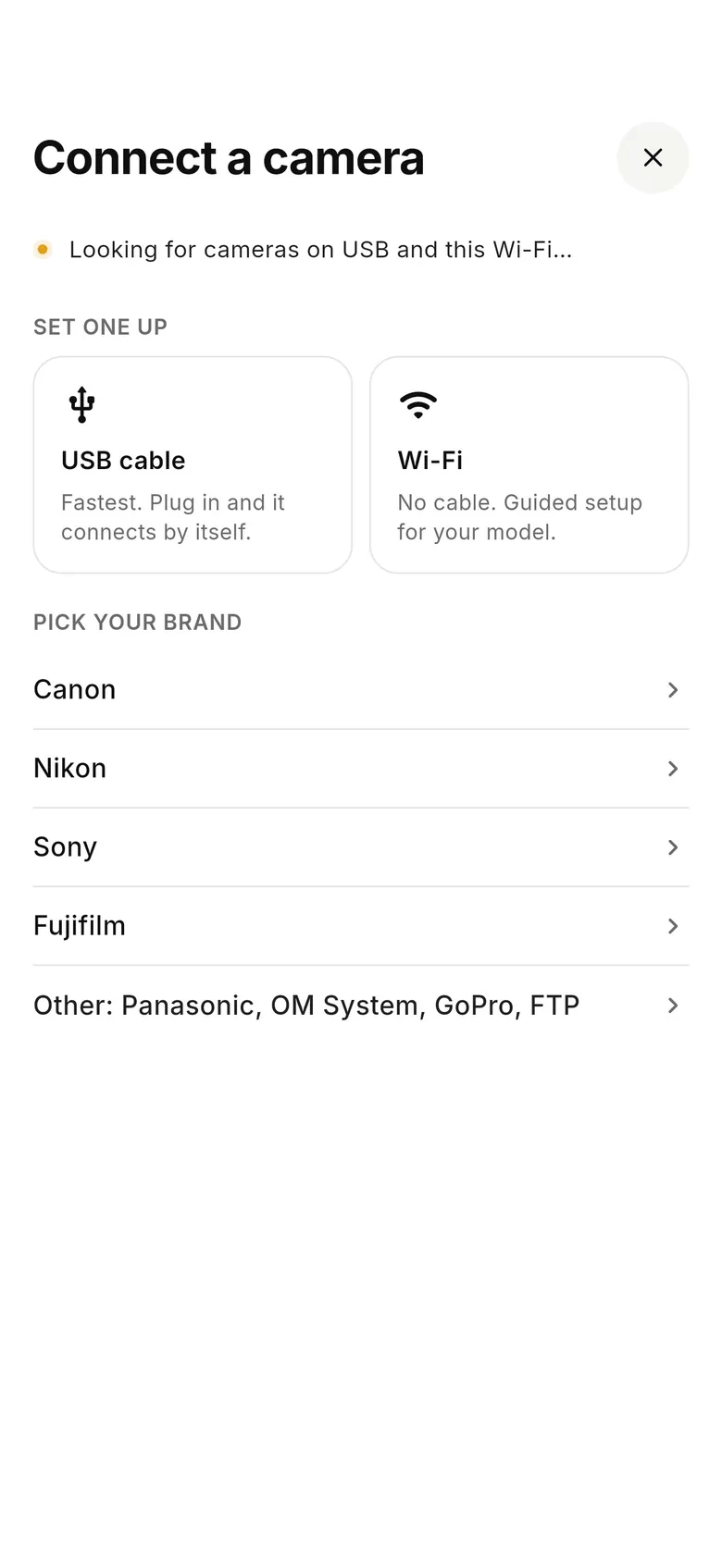
Set USB to PC Remote
In the camera's USB menu choose PC Remote — not mass storage or USB streaming (the ZV-E10 defaults to streaming). Plug a USB-C cable into your phone.
- 2
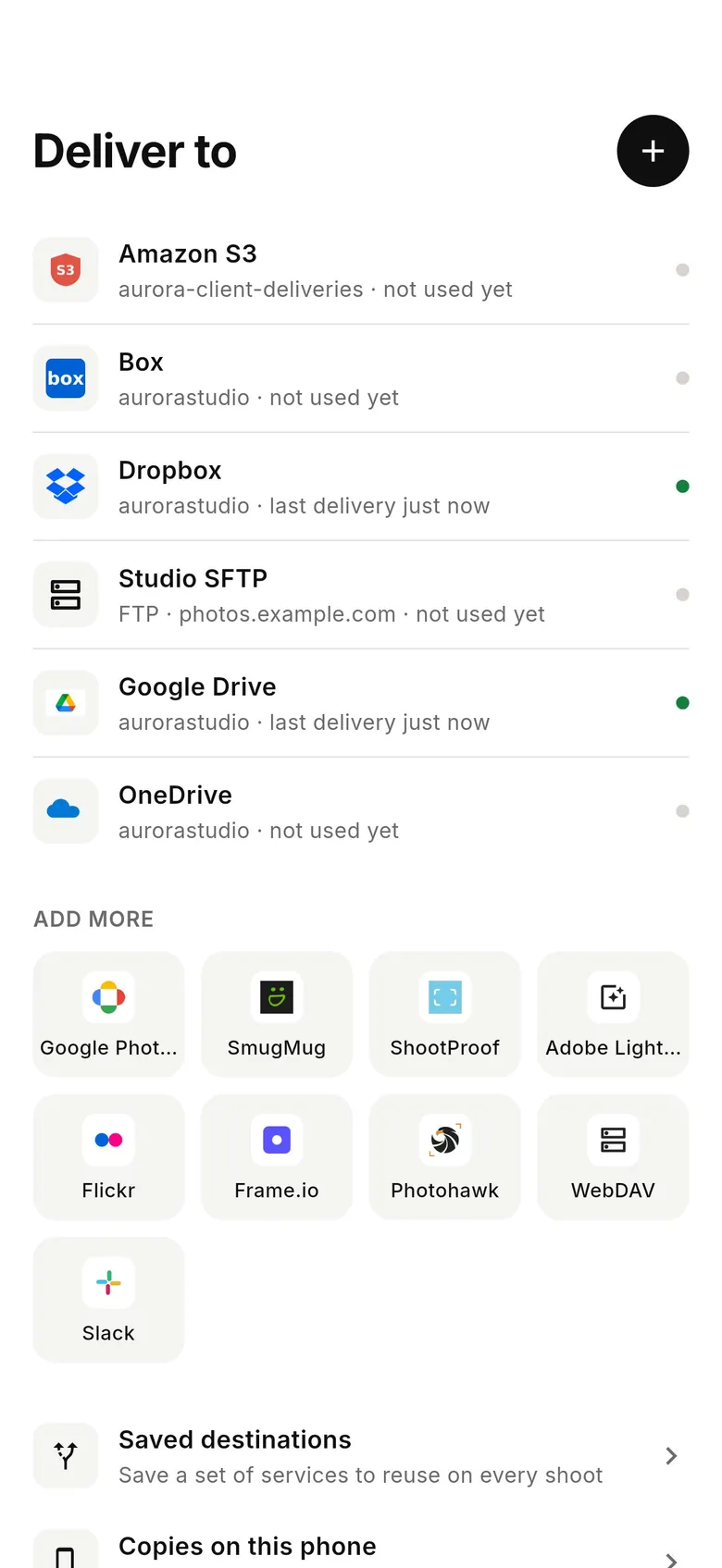
Connect your services
In CloudTether's Deliver tab, add the places your shots should go — Dropbox, Google Drive, SmugMug, ShootProof, FTP and more — then pick them when the camera connects.
- 3
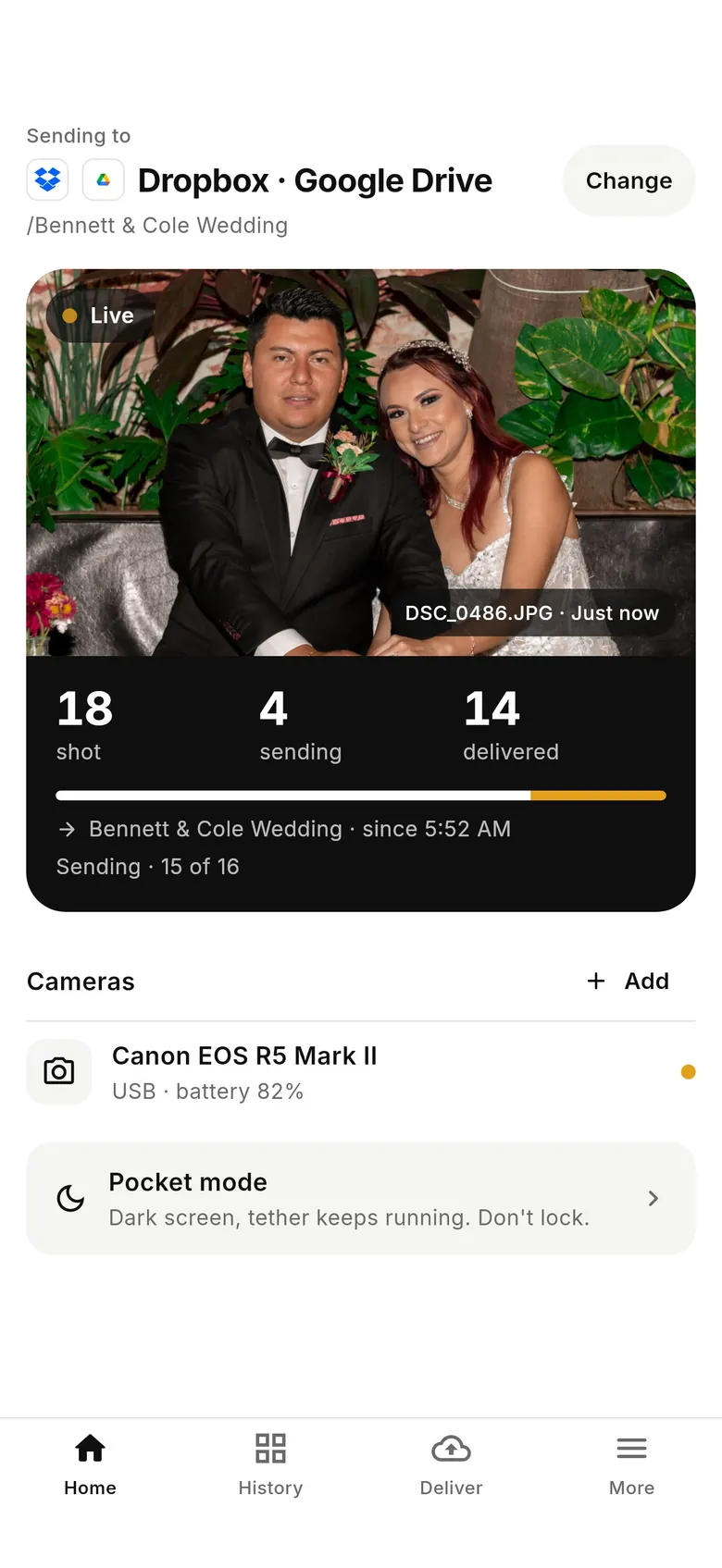
Shoot
Each frame comes off the Sony at full resolution and is sent on. Home shows shots taken, sending and delivered; shots wait on the phone if signal drops.
Why photographers choose CloudTether
- Auto-delivers every shot to the cloud — Dropbox, Google Drive, SmugMug, ShootProof, FTP and more — seconds after the shutter.
- Runs on the iPhone, iPad or Android you already own — nothing extra to set up or power on location.
- Works across Canon, Sony, Nikon and Fujifilm from a single app.
- Upload once, fan out to multiple destinations in one session.
- Uploads over your phone's mobile data — no venue Wi-Fi required.
- Shoot into an album on your phone with no signal — uploads catch up automatically when you're back online.
Sony Creators' App alternative FAQ
What is the best alternative to Sony's Creators' App?
For tethered shooting to a computer, Sony's free Imaging Edge Desktop. For every shot off the camera at full resolution, onto your phone and on to your own Dropbox, Google Drive, gallery or FTP server as you shoot, CloudTether — on iPhone, iPad and Android.
Why won't the Creators' App connect to my camera?
Common causes are a camera that isn't on the Creators' App list (many older bodies use Imaging Edge Mobile), stale Bluetooth pairing, a VPN or airplane mode, or missing Location and Local Network permission on iPhone. Our guide covers each fix.
Is my Sony camera supported by the Creators' App?
Creators' App supports recent bodies on Sony's compatibility list, some after a firmware update. Older Alphas generally use Imaging Edge Mobile instead. CloudTether tethers Sony Alphas over USB in PC Remote mode.
Does CloudTether work with Sony over Wi-Fi?
USB is verified on a Sony ZV-E10 and modern Alphas use the same code; set USB to PC Remote. Sony Wi-Fi depends on the model (newer bodies with wireless PC Remote), so use a cable for paid work unless you've tested yours.
Does CloudTether transfer Sony ARW RAW files?
Yes. Every full-resolution ARW or JPEG is copied off the camera automatically, or you can send only the JPEGs.
Can I send only rated shots from a Sony?
Not over Sony tethering — CloudTether sends every shot. Rated send works on Canon and Nikon. Per destination, you can still send JPEGs only or smaller copies.
Does CloudTether work with cameras other than Sony?
Yes. One app covers Canon, Sony, Nikon and Fujifilm, and one phone can tether a Sony and a Canon at the same time.
See it for yourself
Install CloudTether, connect your camera and take a test shot — it'll be on your phone and on its way before you lower the camera. Start with a 7-day free trial.
Read next
- Sony Creators' App won't connect? Fixes
- Sony camera tethering with CloudTether
- Sony Imaging Edge Mobile alternative
- Sony Imaging Edge Desktop: tether to a computer
- Camera not detected over USB? Fixes
Comparing more tools? See the best camera tethering software roundup.
More comparisons