
Photo Mechanic alternative or companion? Desktop ingest vs live delivery from your phone
Short answer: CloudTether isn't a Photo Mechanic replacement, and if you want fast culling, captioning and IPTC metadata at a desk, nothing here beats Photo Mechanic. CloudTether is the alternative for one specific job Photo Mechanic doesn't do on its own: getting every frame off the camera and delivered — to an editor's FTP server, a client's Dropbox or a gallery — while you're still shooting, from an iPhone, iPad or Android phone, with no laptop.
Most working pros who try CloudTether keep Photo Mechanic. Here's where each fits, how they compare, and a three-step workflow that uses both.
iPhone, iPad and Android · facts checked November 2026
Cloud storage
Galleries & proofing



Messaging
Transfer & servers
What Photo Mechanic is
Photo Mechanic is a fast desktop ingest, culling and metadata tool (Mac and Windows) loved by working pros for rapidly browsing, rating and tagging huge take-downs once the cards come out of the camera.
Where CloudTether is different
They work at different stages. Photo Mechanic starts once images are already on a computer — it's built for speed-culling and metadata, not for getting images off the camera. CloudTether runs during the shoot, on your phone: every frame is pulled from the camera and delivered to the cloud in real time, with no card-shuffle and nothing to import.
What Photo Mechanic does well
- Fast ingest from cards — including to two locations at once — and very quick browsing, rating and culling of large take-downs.
- Captions, keywords, copyright and full IPTC metadata, with code replacements and templates that make captioning a whole event fast.
- Live Ingest watches folders and brings in new photos as they appear — for example from a Wi-Fi or Ethernet tethering set-up — applying your metadata template on the way in.
- Batch renaming, resizing, watermarking and export, and upload to FTP and SFTP servers and photo services; Photo Mechanic Plus adds a catalogue for asset management. Mac and Windows.
Why people look for a Photo Mechanic alternative
These are the issues photographers most often search for — common, well-documented ones, not a verdict on the app. Many have fixes, and it's worth trying them first.
It starts at the computer
Photo Mechanic works on files that reach a computer — from a card or a watched folder. Getting frames off the camera on location, without a laptop, is outside its job.
A laptop on location
Filing during an event means a computer, power and somewhere to set it up, plus a way to get images to it.
Uploads are a separate step
Its FTP uploader sends images you select. Sending every new frame to a client folder or gallery automatically isn't what it's built around.
Desktop only
There's no Photo Mechanic phone app, so it can't run from the device already in your pocket.
Photo Mechanic vs CloudTether, side by side
| Feature | Photo Mechanic | CloudTether |
|---|---|---|
| What it is | Desktop ingest, culling and metadata software | Phone app that gets every frame off the camera and delivers it |
| When it works | After the shoot (or from a watched folder) | During the shoot |
| Runs on | Mac, Windows | iPhone, iPad, Android |
| Gets photos off the camera | From cards, or folders other tools fill | Over USB-C, or Wi-Fi (verified on Canon), as each frame is written |
| Captions and IPTC | Yes — its core strength | No — the camera's metadata stays in the file |
| Where photos go | Folders on the computer; FTP/SFTP and photo services on upload | FTP/SFTP, Dropbox, Google Drive, galleries, Lightroom or S3 — automatically, several at once |
| Licence | Subscription or perpetual licence | Subscription |
Based on vendor pages, app-store listings and press coverage as of November 2026. Features vary by camera and app version — check Photo Mechanic's own documentation for your model. Product names are trademarks of their owners.
Should you switch?
Switch to CloudTether if…
- You need frames delivered during the shoot — to an editor, a client folder or a live gallery — and you don't want a laptop on location.
- Every frame should be backed up off the camera as it's taken, not after you ingest the cards.
- You want to send only shots you rate on a Canon or Nikon, straight from the camera.
- A second shooter should feed the same delivery folder from their phone.
Stick with Photo Mechanic if…
- You cull, caption and keyword at a desk — Photo Mechanic is the tool; CloudTether doesn't caption, and its on-device AI-Culling only flags weak frames before delivery.
- You file to a wire with code replacements and IPTC templates.
- You ingest cards to two drives and manage a catalogue.
Plenty of photographers keep both: Photo Mechanic for what it's best at, CloudTether for getting every frame delivered.
How to switch in 3 steps
Install CloudTether, then:
- 1
Tether to your phone
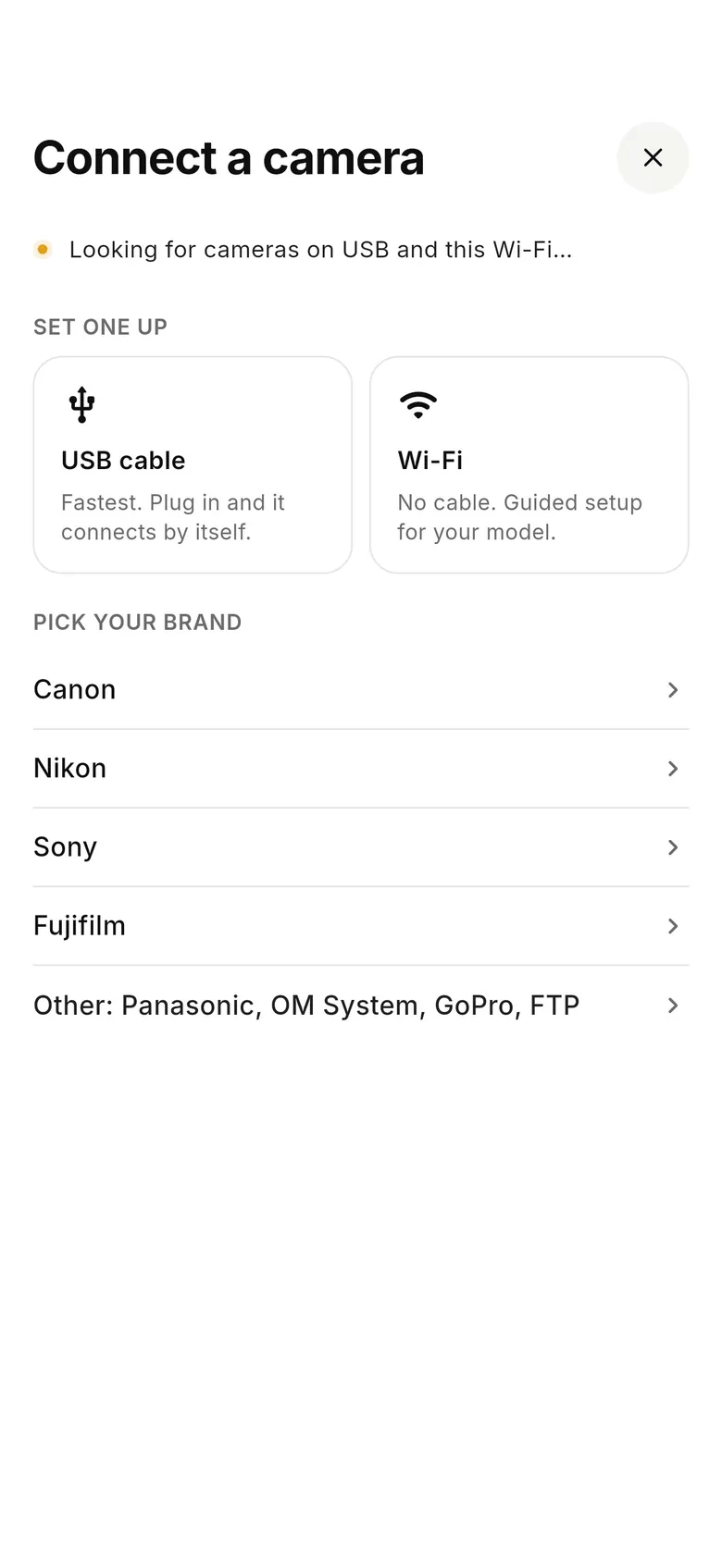
Connect the camera to your phone with a USB-C cable, or over Wi-Fi on a Canon, and tap “Connect a camera”.
- 2
Send to a folder Photo Mechanic watches
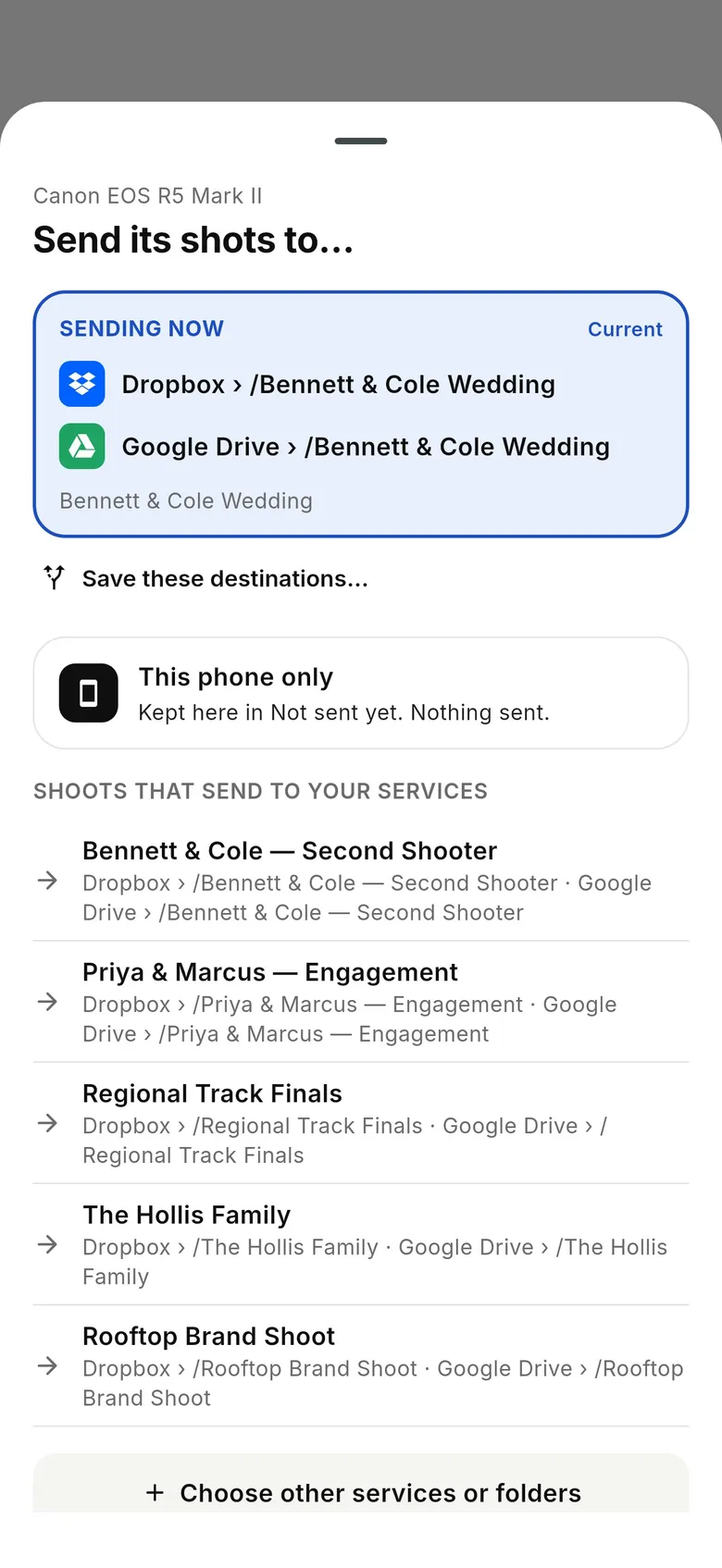
Point the shoot at a Dropbox or Google Drive folder that syncs to your editing computer — or your own SFTP server — and add any client folder or gallery as a second destination.
- 3
Cull and caption in Photo Mechanic
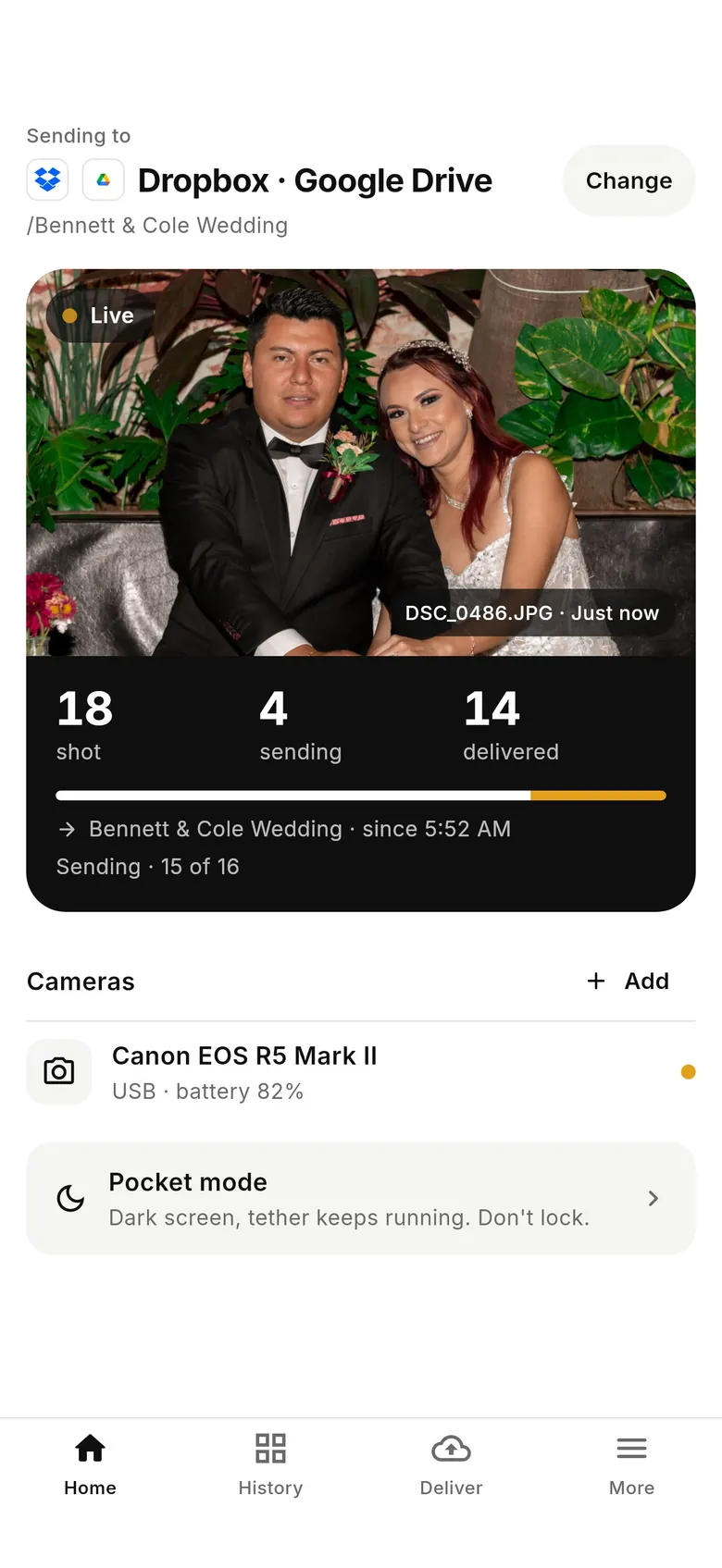
As frames land in the synced folder, Photo Mechanic's Live Ingest can bring them in with your metadata template, ready to caption and file.
Why photographers choose CloudTether
- Auto-delivers every shot to the cloud — Dropbox, Google Drive, SmugMug, ShootProof, FTP and more — seconds after the shutter.
- Runs on the iPhone, iPad or Android you already own — nothing extra to set up or power on location.
- Works across Canon, Sony, Nikon and Fujifilm from a single app.
- Upload once, fan out to multiple destinations in one session.
- Uploads over your phone's mobile data — no venue Wi-Fi required.
- Shoot into an album on your phone with no signal — uploads catch up automatically when you're back online.
Photo Mechanic alternative FAQ
Is CloudTether a Photo Mechanic alternative?
They solve different problems. Photo Mechanic is a desktop tool for culling and tagging images you've already imported; CloudTether gets images off the camera and into the cloud in real time from your phone. Many photographers use both — CloudTether on set, Photo Mechanic back at the desk.
Can CloudTether deliver shots during the shoot instead of after?
Yes — that's the point. CloudTether detects each capture and delivers the full-resolution file from your phone to destinations like Dropbox, Google Drive, SmugMug and ShootProof as you shoot, over USB or Wi-Fi.
What is the best Photo Mechanic alternative?
For culling, captioning and IPTC metadata at a desk, Photo Mechanic is the benchmark, and CloudTether doesn't compete with it. If what you're really after is getting frames off the camera and delivered while you're still shooting, without a laptop, CloudTether is the alternative for that part of the job.
Can CloudTether feed Photo Mechanic's Live Ingest?
Yes. Send the shoot to a Dropbox or Google Drive folder that syncs to your editing computer, or to your own SFTP server, and point Photo Mechanic's Live Ingest at that folder. New frames arrive as you shoot, ready to caption.
Does CloudTether add captions or IPTC metadata?
No. It delivers the file the camera wrote, with the camera's own metadata intact. Captions, keywords and code replacements are Photo Mechanic's job.
Does Photo Mechanic run on a phone?
No. Photo Mechanic runs on Mac and Windows. CloudTether runs on iPhone, iPad and Android, which is why the two fit together: the phone delivers on location, the computer culls and captions.
Can I send only my best frames to the editor?
Yes. Rate shots on a Canon or Nikon and CloudTether can send only the rated ones; or send everything and let the editor cull in Photo Mechanic.
See it for yourself
Install CloudTether, connect your camera and take a test shot — it'll be on your phone and on its way before you lower the camera.
Read next
- Send photos to an editor in real time
- Tether to your own SFTP or FTP server
- Multiple photographers, one delivery folder
- Best camera tethering software (2026)
Comparing more tools? See the best camera tethering software roundup.
More comparisons