
The best Cascable alternative for auto-delivery on iPhone and Android
If you use Cascable mainly to get photos off the camera, and what you really need is every shot delivered to the cloud, a gallery or an FTP server as you work — on iPhone, iPad or Android — the best Cascable alternative is CloudTether. It tethers Canon, Nikon, Sony and Fujifilm over USB-C or Wi-Fi and sends every full-resolution frame onward automatically.
If you need wireless remote control and live view on an Apple device, Cascable is excellent and CloudTether doesn't try to replace it.
7-day free trial · iPhone, iPad and Android · facts checked October 2026
Cloud storage
Galleries & proofing



Messaging
Transfer & servers
What Cascable is
Cascable is a well-regarded app for iPhone, iPad and Mac that connects to a broad range of cameras, mostly over Wi-Fi — live view, remote shooting, automation tools, and importing and editing photos on the device.
Where CloudTether is different
Cascable is built around camera control and importing to your device. CloudTether is built around automatic delivery: every frame is detected and routed onward to the cloud destinations you choose, hands-free, while you keep shooting — and on to multiple destinations at once.
What Cascable does well
- Cascable is a long-running app for iPhone, iPad and Mac with wireless support for a very broad list of cameras — Canon, Fujifilm, Nikon, Olympus, Panasonic, Sony and more.
- Live view, remote control, time-lapse and bracketing tools and an automation builder make it a strong remote for a camera you can't stand behind.
- It imports photos to the device, edits them, and offers its Pro features as a one-off purchase or a subscription.
Why people look for a Cascable alternative
These are the issues photographers most often search for — common, well-documented ones, not a verdict on the app. Many have fixes, and it's worth trying them first.
No Android version
Cascable runs on Apple devices. Teams with Android phones need something else.
RAW over Wi-Fi varies by camera
Cascable's own notes say some cameras, including Fujifilm models, can't send RAW over Wi-Fi.
Pro features
Some features need Cascable Pro, so check which tier covers what you need.
Import, then deliver
Photos come into the app; sending every shot to a client folder or server as you shoot isn't its main job.
Cascable vs CloudTether, side by side
| Feature | Cascable | CloudTether |
|---|---|---|
| Runs on | iPhone, iPad, Mac | iPhone, iPad, Android |
| Connection | Mostly Wi-Fi; USB on some set-ups | USB-C cable or Wi-Fi (Wi-Fi verified on Canon) |
| Cameras | A broad multi-brand list | Canon, Nikon, Sony, Fujifilm (+ other PTP cameras over USB, unverified) |
| Live view and remote control | Yes — the main purpose | No — you shoot on the camera |
| What transfers | Imports you choose to the device | Every full-resolution RAW or JPEG, automatically |
| Where photos go | The device | The phone, plus cloud storage, galleries, FTP/SFTP or S3 — several at once |
| Pricing model | Free app with paid Pro features | 7-day free trial, then a subscription |
Based on vendor pages, app-store listings and press coverage as of October 2026. Features vary by camera and app version — check Cascable's own documentation for your model. Product names are trademarks of their owners.
Should you switch?
Switch to CloudTether if…
- You or your team use Android phones.
- You need every frame delivered automatically to Dropbox, Google Drive, a gallery or FTP/SFTP.
- You want a USB cable for speed — CloudTether tethers all four main brands over USB.
- You want to send only shots you rate on a Canon or Nikon.
Stick with Cascable if…
- You need live view, remote shutter or automation — CloudTether has none.
- Your camera is a Panasonic or Olympus body controlled over Wi-Fi; CloudTether's Wi-Fi doesn't cover them.
- You edit on the device and only need a few imports.
Plenty of photographers keep both: Cascable for what it's best at, CloudTether for getting every frame delivered.
How to switch in 3 steps
Install CloudTether, then:
- 1
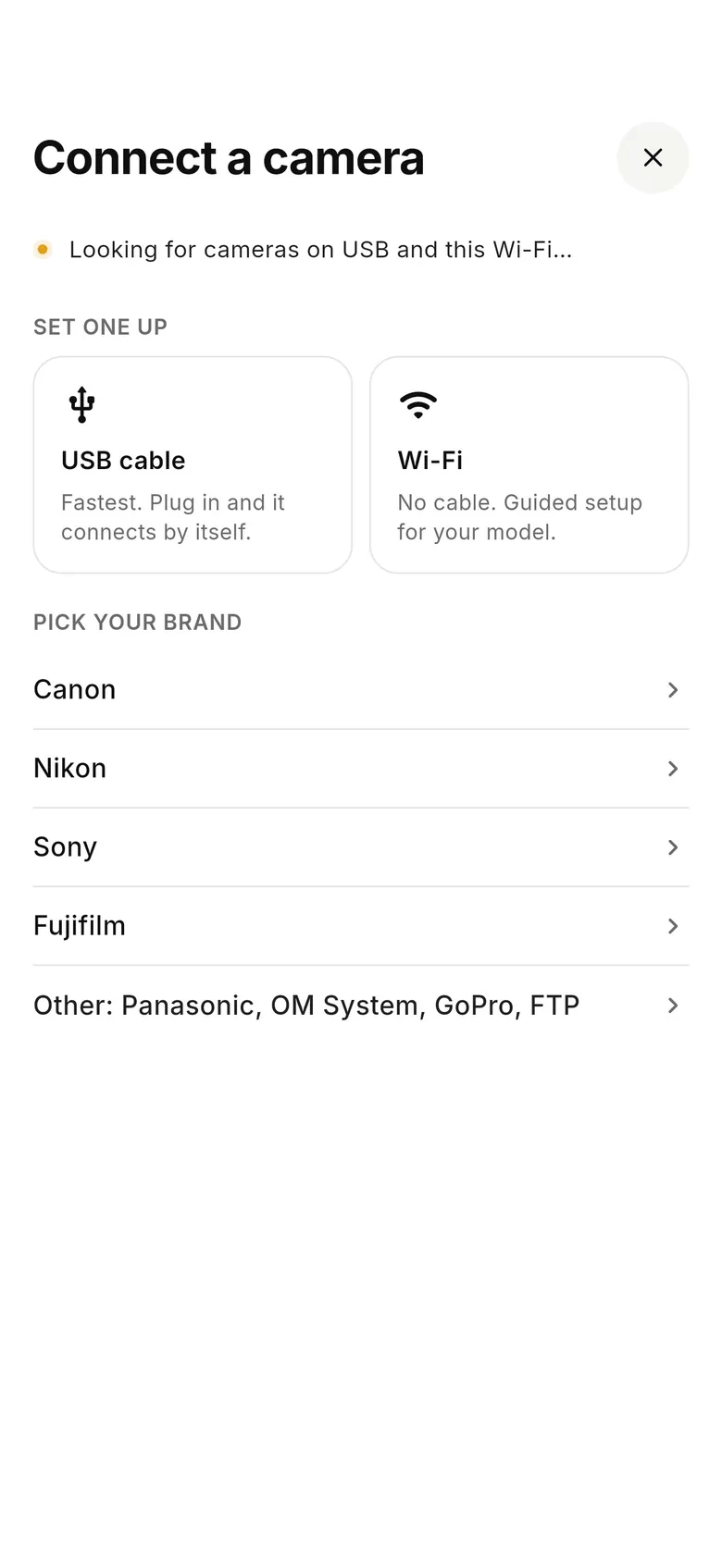
Connect the camera
Tap “Connect a camera” and plug in a USB-C cable (tether mode on Sony and Fujifilm), or use Wi-Fi on a Canon with “Remote control (EOS Utility)”.
- 2
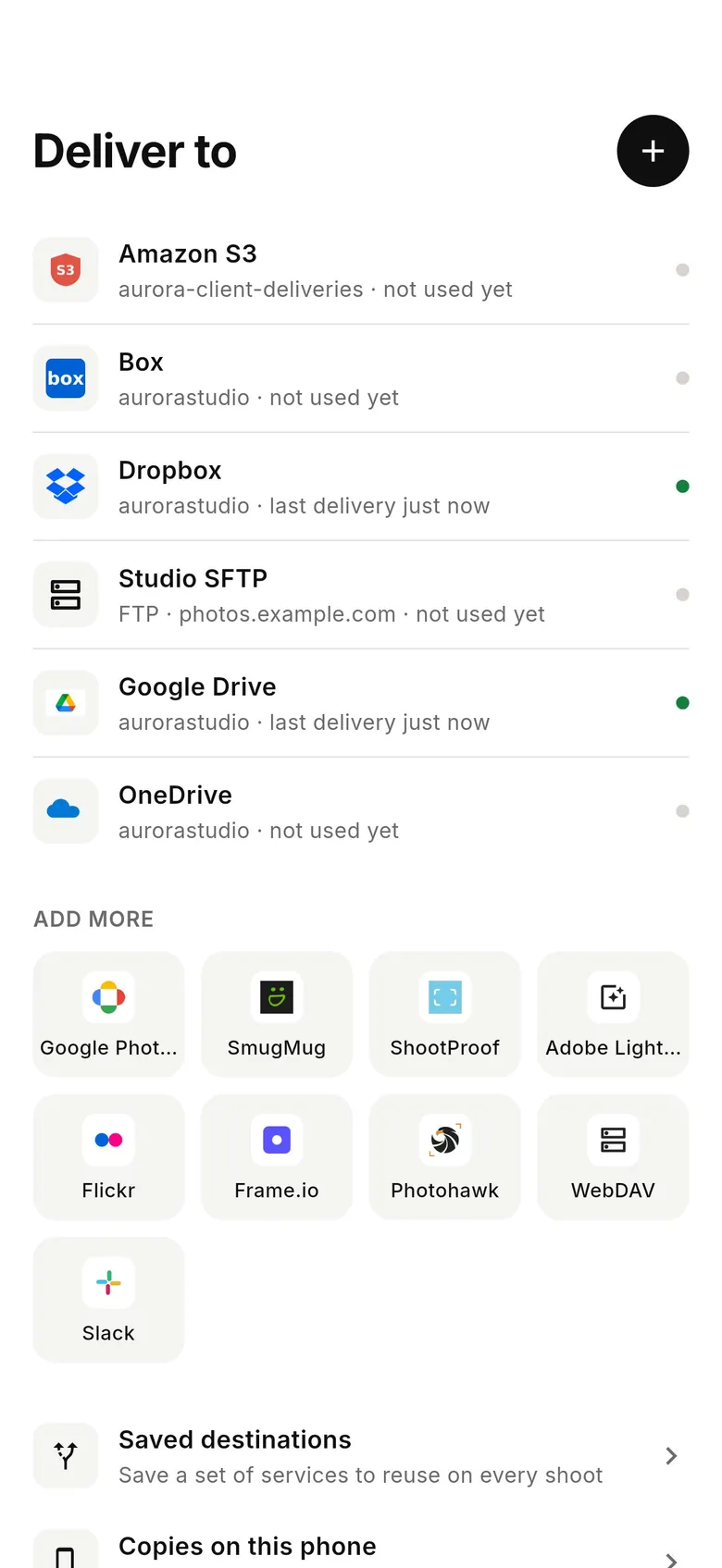
Add where shots go
In the Deliver tab, connect Dropbox, Google Drive, a gallery or an FTP/SFTP server; a shoot can send to several at once.
- 3
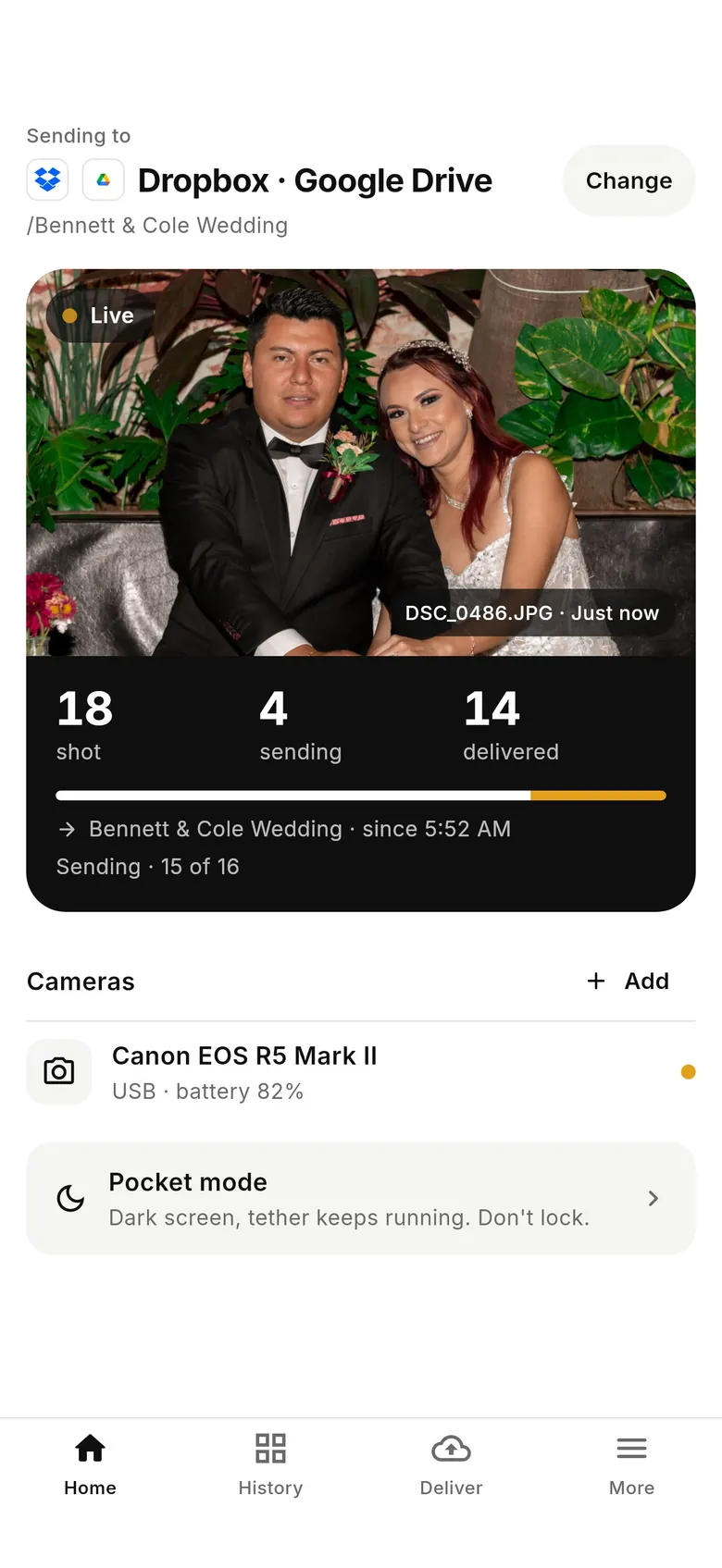
Shoot
Every frame comes off at full resolution and is delivered; Home shows what's been shot, is sending and has arrived.
Why photographers choose CloudTether
- Auto-delivers every shot to the cloud — Dropbox, Google Drive, SmugMug, ShootProof, FTP and more — seconds after the shutter.
- Runs on the iPhone, iPad or Android you already own — nothing extra to set up or power on location.
- Works across Canon, Sony, Nikon and Fujifilm from a single app.
- Upload once, fan out to multiple destinations in one session.
- Uploads over your phone's mobile data — no venue Wi-Fi required.
- Shoot into an album on your phone with no signal — uploads catch up automatically when you're back online.
Cascable alternative FAQ
What is the best alternative to Cascable?
For wireless remote control with dedicated hardware, CamRanger. For a free remote within one brand, the camera maker's app. For every shot delivered to the cloud, a gallery or FTP as you shoot — on iPhone, iPad or Android — CloudTether.
Is there a Cascable for Android?
Cascable runs on iPhone, iPad and Mac. CloudTether runs on Android (6.0 or later) as well as iPhone and iPad — it tethers your camera over USB-C or Wi-Fi and delivers every shot as you shoot.
Is CloudTether a Cascable alternative?
If your goal is to get every shot off the camera and delivered automatically as you shoot — rather than to remotely control the camera — CloudTether is purpose-built for that across Canon, Nikon, Sony and Fujifilm.
Does CloudTether have live view or remote control like Cascable?
No. You shoot on the camera as normal and every frame comes off it automatically. For live view and remote control, Cascable is the better tool.
Does CloudTether transfer RAW files?
Yes — the full-resolution RAW (CR3, NEF, ARW, RAF and others) or JPEG the camera recorded, over USB or Wi-Fi. Use USB for Fujifilm, where CloudTether's Wi-Fi is experimental.
Does CloudTether upload straight to cloud destinations?
Yes. CloudTether delivers each photo to destinations like Dropbox, Google Drive, SmugMug, ShootProof and FTP/SFTP as you shoot — and to several at once.
Does CloudTether work with Panasonic or Olympus cameras?
Panasonic Lumix, OM System and other standard PTP cameras can connect over USB from the app's “Other” option, but we haven't verified them, and Lumix Wi-Fi isn't supported. For those bodies over Wi-Fi, Cascable is the better fit.
What happens if I lose signal while shooting?
Nothing is lost. The camera-to-phone link doesn't need the internet, so every shot still comes off the camera and waits safely on the phone; uploads to your services start by themselves when the connection is back.
See it for yourself
Install CloudTether, connect your camera and take a test shot — it'll be on your phone and on its way before you lower the camera. Start with a 7-day free trial.
Read next
- Best camera tethering software (2026)
- Android camera tethering
- How to tether your camera to your phone wirelessly
- Camera tethering software for your phone
Comparing more tools? See the best camera tethering software roundup.
More comparisons