Camera Tethering Cable: Which One You Need (2026)
Short answer: a tethering cable is a USB data cable with the right plug at each end — your camera's port on one side, your phone's or computer's on the other. Most cameras made in the last few years have USB-C, so a good USB-C to USB-C data cable is all a USB-C phone or laptop needs. Older bodies use Micro-B USB 3, Mini-B or Micro-USB. Length, build quality and the connection type matter more than the brand name.
What a tethering cable actually is
There's no special tethering protocol in the wire. A tether cable is a USB cable that carries data as well as power, so your camera can talk PTP (picture transfer protocol) to the device at the other end and hand over each photo as you shoot. What separates a "tether cable" from the one in your drawer is the plug at each end, the length, how well it's shielded and how securely it stays in. If you're still deciding whether you need a cable at all, start with our guide to whether you need a tether cable; this guide is about choosing the right one.
Step 1: find your camera's USB port
Look at the port behind the camera's side door, or check the specifications page of the manual (it's usually listed as the "digital terminal" or "USB terminal"). You'll find one of four shapes. USB-C is small, oval and reversible — current mirrorless bodies from Canon, Nikon, Sony, Fujifilm and Panasonic mostly use it. Micro-B USB 3 is a wide, two-part plug found on many pro DSLRs from the mid-2010s; it also accepts an ordinary Micro-USB plug, but only at USB 2 speed. Mini-B is a small trapezoid used on older DSLRs. Micro-USB is the thin plug of older phones, found on many entry-level and compact cameras. Some bodies, such as several Sony Alpha models, have both USB-C and Micro-USB; use the USB-C port for tethering.
| Port | What it looks like | Typically found on | Speed |
|---|---|---|---|
| USB-C | Small, rounded, reversible | Most current mirrorless bodies | USB 2 to USB 3.2, depending on the camera |
| Micro-B USB 3 | Wide plug with two parts side by side | Many pro DSLRs from about 2012 to 2018 | USB 3 (USB 2 with a plain Micro-USB plug) |
| Mini-B | Small trapezoid, thicker than Micro-USB | Older DSLRs | USB 2 |
| Micro-USB | Thin, flat trapezoid | Entry-level, compact and some older mirrorless bodies | USB 2 |
Common ports by camera brand
The table below covers well-known bodies. Ports change between generations — an "II" model can switch connectors — so treat it as a starting point and confirm in your manual before you order a cable.
| Brand | USB-C (examples) | Older connectors (examples) |
|---|---|---|
| Canon | EOS R5, R5 Mark II, R6 Mark II, R7, R8, R3, R1 | 5D Mark IV and 1D X Mark II: Micro-B USB 3 · 5D Mark III and 7D: Mini-B |
| Nikon | Z6, Z7, Z6 II, Z7 II, Z6 III, Z8, Z9, Zf, D780, D6 | D850, D810 and D500: Micro-B USB 3 |
| Sony | α1, α7 IV, α7R V, α7C II, α6700, ZV-E10 II | α6400, α6600 and ZV-E10: Micro-USB |
| Fujifilm | X-T3, X-T4, X-T5, X-H2, X-H2S, X-S20, GFX 100 II | Check older X bodies in the manual |
| Panasonic | S5, S5 II, S1, GH5, GH6, G9 | Check older G and compact bodies in the manual |
Examples from manufacturers' published specifications; check your exact model. CloudTether has verified USB tethering on the Canon EOS R7 and R5 Mark II, Nikon Z6, Sony ZV-E10 and Fujifilm X-T3.
Step 2: match the phone, tablet or computer end
iPhone 15 and later, iPad models with USB-C and almost every Android phone have a USB-C port, so a cable with USB-C at both ends connects a USB-C camera directly — no adapter. For an older camera, buy a USB-C to Micro-B, USB-C to Mini-B or USB-C to Micro-USB cable rather than stacking adapters. iPhones with a Lightning port (iPhone 14 and earlier) need Apple's Lightning to USB 3 Camera Adapter: it gives you a full-size USB-A socket for the camera's cable, plus a Lightning port to charge the phone while you tether. Laptops are the same story: newer Macs and many Windows laptops are USB-C only, while older ones have USB-A, so pick a cable that ends in what your computer actually has. Plug straight into the computer's own port; unpowered hubs and docks are a common cause of dropouts.
How long should a tether cable be?
Tethering to a phone that sits on the camera strap, a belt clip or a cold-shoe mount needs only a short cable — 30 cm to 1 m is plenty, and shorter is more reliable. Tethering to a laptop on a cart or desk in the studio is where long cables come in: 3 to 5 m (about 10 to 15 ft) is typical. USB has length limits. A passive USB 2 cable is specified to about 5 m, and a passive USB 3 cable is usually reliable only to around 3 m. Beyond that, use an active cable or an active extension, which boosts the signal along the way, rather than joining two passive cables. A long, thin, cheap cable is the classic cause of a tether that drops every few minutes or makes the camera disconnect in the middle of a burst.
USB 2 vs USB 3: does speed matter?
USB 2 tops out at 480 Mbit/s; USB 3 starts at 5 Gbit/s. In practice the camera is often the bottleneck, so a USB 3 cable won't double a USB 2 camera's speed. It matters most for big RAW files from high-resolution bodies tethered to a laptop. For a phone, the phone's port sets the limit too: Lightning iPhones and many standard USB-C models run at USB 2 speed, while Pro iPhones from the iPhone 15 Pro on support USB 3 with a USB 3 cable. Even at USB 2 speed a cable is quick — in CloudTether's logs a Canon EOS R5 Mark II JPEG reached the phone in a median 0.06 s over USB, against 0.20 s over Wi-Fi.
What makes a tether cable reliable
First, it must carry data: many USB-C cables are charge-only, and a camera that charges but never shows up is the giveaway. Second, it should stay in. A sideways tug can pull a plug out or, worse, damage the camera's port, so pro tether cables use thicker strain relief, and many photographers add a cable clamp or lock that anchors the cable to the camera or tripod (Tether Tools' JerkStopper is a well-known example). A right-angle plug helps where the cable exits next to a grip or a flash. Third, it should be easy to see: bright-coloured cables are popular in studios because people step over them instead of on them. Finally, carry a spare. Cables are the cheapest part of the setup and the most likely to fail.
Tether Tools TetherPro and other tether cables
Tether Tools' TetherPro range is the best-known name in dedicated tether cables, sold in the common camera connector types and lengths and in a high-visibility orange. Camera makers sell their own interface cables too, and plenty of general-purpose cables work fine. What matters is not the logo but the specification: the right connectors, data support, a sensible length for the connection type, and solid strain relief. A good short cable from any reputable maker will tether a camera to a phone.
Tethering to a phone vs a laptop
The two jobs need different cables. A laptop tether in the studio is about distance — the camera moves around the set while the computer stays put, so you need a long, robust, ideally active cable and a way to lock it at both ends. A phone tether is about staying out of the way — the phone travels with you, so the shortest data cable that reaches is best, and it's easy to keep a spare in a pocket. A phone tether also does a different job: instead of reviewing on a calibrated monitor, the phone backs up each shot and can deliver it to Dropbox, Google Drive, a client gallery or an FTP server while you keep shooting.
Or skip the cable: wireless tethering
Many cameras can tether over their own Wi-Fi instead. A wireless tether means nothing to trip over and nothing to unplug, at the cost of speed and some reliability — Wi-Fi was roughly three times slower than USB on the same camera in our logs, and it depends on radio conditions. In CloudTether, Wi-Fi tethering is verified on Canon, depends on the model for other brands, and is experimental on Fujifilm. A common pattern is a cable on a tripod and Wi-Fi when you're moving. Bluetooth won't do it: it's for pairing and location, not full-resolution files.
Tether your camera to your phone with CloudTether
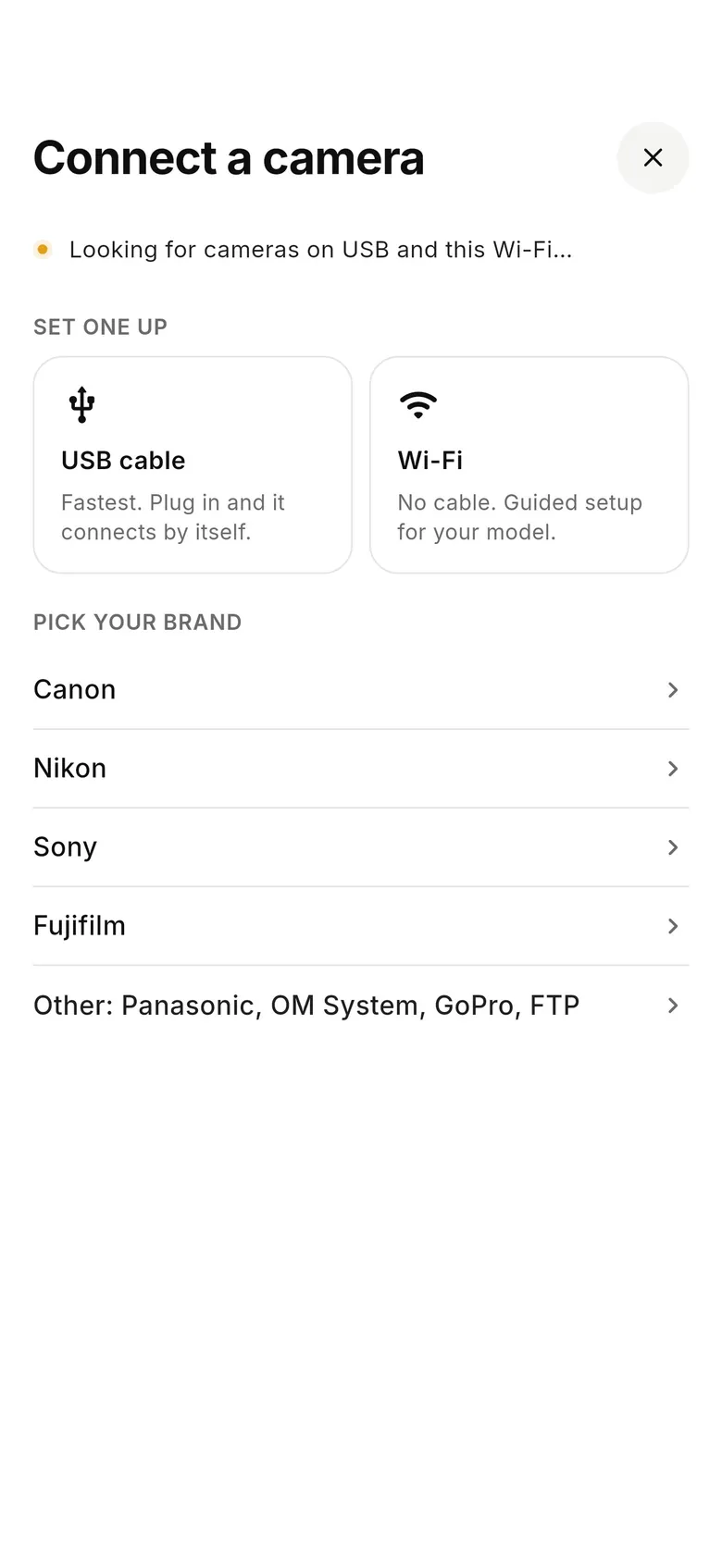
CloudTether tethers Canon, Nikon, Sony and Fujifilm cameras to an iPhone, iPad or Android phone over USB or Wi-Fi. Plug in a data cable — set Sony to PC Remote and Fujifilm to USB tether, and turn a Canon's Wi-Fi off first — then tap Connect a camera. Every full-resolution RAW or JPEG comes off the camera seconds after you shoot, and can stay on the phone or go to your cloud services and galleries. There's a 7-day free trial, so you can test your camera and cable before a paid job.
FAQ
What cable do I need to tether my camera?
A USB data cable with your camera's port on one end — usually USB-C on current cameras, otherwise Micro-B USB 3, Mini-B or Micro-USB — and your phone's or computer's port on the other. A Lightning iPhone also needs Apple's Lightning to USB 3 Camera Adapter.
Is any USB-C cable a tethering cable?
Only if it carries data. Many USB-C cables are charge-only. If the camera charges but the phone or computer never sees it, swap the cable for a data cable.
What is the best tethering cable for Canon?
Current EOS R bodies use USB-C, so a quality USB-C data cable — USB-C to USB-C for a phone or newer laptop, USB-C to USB-A for an older computer. The 5D Mark IV and 1D X Mark II use Micro-B USB 3, and older bodies such as the 5D Mark III use Mini-B. Check your model's manual.
How long can a tether cable be?
Passive USB 2 cables are specified to about 5 m and passive USB 3 cables are reliable to around 3 m. For longer runs, use an active cable or active extension. To a phone on the camera, a cable under 1 m is best.
Do I need a USB 3 tether cable?
Only if both the camera and the device support USB 3 and you move a lot of large RAW files. Many cameras and phones are limited to USB 2 speed anyway, and a USB 2 tether is still fast.
Can I tether a camera to an iPhone with a cable?
Yes. A USB-C iPhone (iPhone 15 and later) takes a USB-C cable straight from the camera. A Lightning iPhone needs Apple's Lightning to USB 3 Camera Adapter plus the camera's USB cable.
Can I tether without a cable?
Yes, over the camera's Wi-Fi. It's slower and depends on radio conditions, so USB is the better choice for a fixed setup. In CloudTether, Wi-Fi is verified on Canon and experimental on Fujifilm.
Tether your camera to the cloud with CloudTether
Deliver every shot to the cloud or a client gallery, live as you shoot — no laptop. Start with a 7-day free trial on iPhone, iPad or Android.
Related
- Tether cable picker: find your exact cable
- Camera compatibility checker: will it tether to your phone?
- Do you still need a tether cable?
- Camera tethering app for iPhone: USB-C, Lightning or Wi-Fi
- Tether a camera to Android over USB-C
- Wireless camera tethering
- Camera not detected over USB? Fixes
- USB vs Wi-Fi tethering speed test