Resized delivery: smaller JPEGs for clients, full size for you
CloudTether can deliver smaller copies of your photos instead of the full-size originals — 4,096, 2,048 or 1,024 px on the long edge, or a size and JPEG quality of your own. Set it for a whole shoot, or per destination so a client gallery gets light 2,048 px JPEGs while Dropbox keeps every full-size file. Your phone still uploads each shot only once; the smaller copies are made afterwards.
- Original, 4096, 2048 or 1024 px
- Custom long edge 800–8,000 px, quality 60–100
- Different sizes per destination
- Still one upload per shot from the phone
Why resize on delivery
A 45-megapixel JPEG is overkill for a phone screen, a social post or a same-day preview, and it makes galleries slow for clients on mobile data. A 2,048 px copy looks sharp on any phone and opens instantly. Meanwhile your archive, your retoucher and your backup want the full file. Resized delivery gives each the right thing from the same shoot — without exporting anything by hand.
How it works
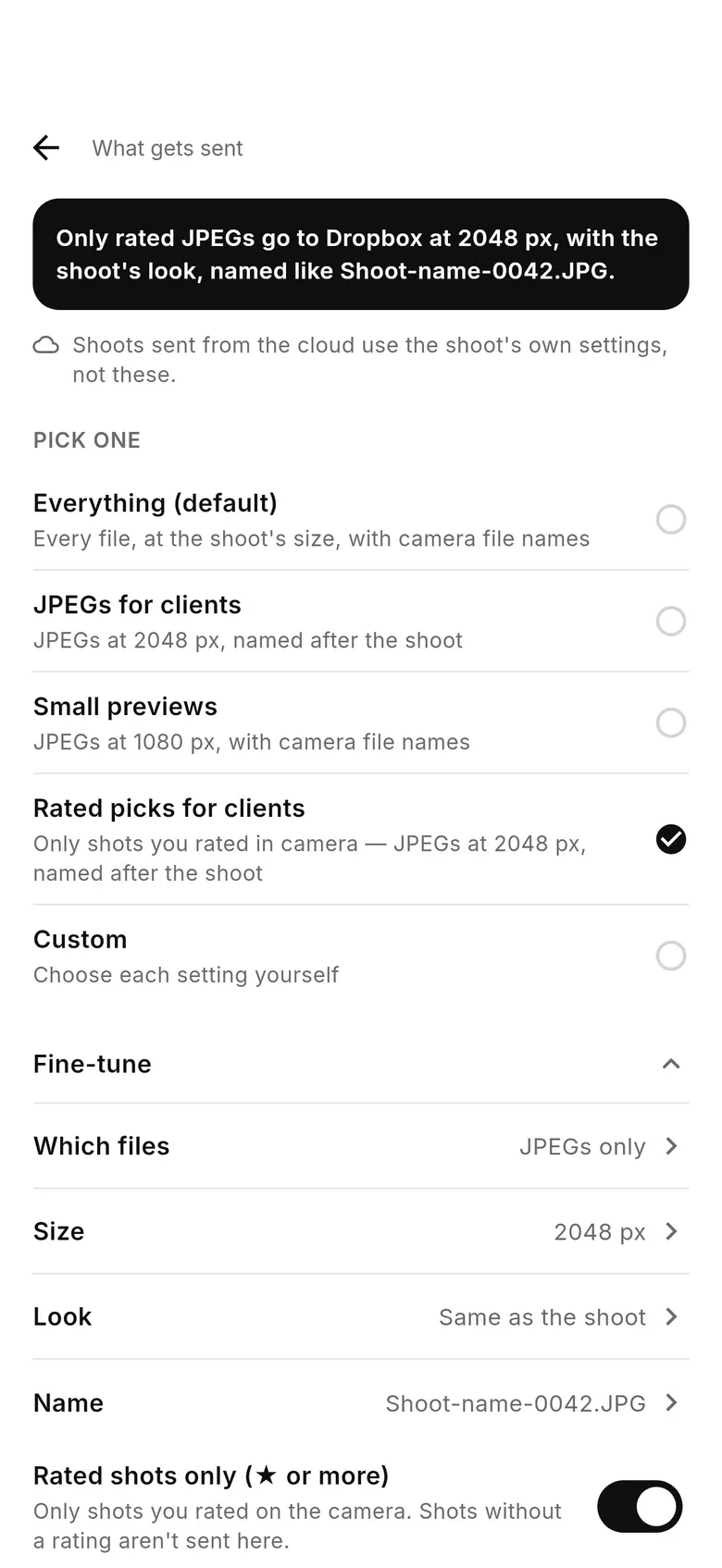
In the shoot's settings, “Delivery resolution” sets the size of copies sent to its destinations: Original, Large (4,096 px), Web (2,048 px) or Small (1,024 px), measured on the long edge. “Custom…” lets you pick your own long edge from 800 to 8,000 px and a JPEG quality from 60 to 100. Per destination, What gets sent offers presets — “JPEGs for clients” (2,048 px, named after the shoot) and “Small previews” (1,080 px) — and Fine-tune sizes of its own.
Only JPEGs are resized; RAW files are always delivered full size. Resizing doesn't make your phone upload less — each shot goes up once at full resolution and the copies are made from it. To send less from the phone, use JPEG only. Services CloudTether delivers from its servers use the shoot's own size, and the screen says so where that applies.
Sizes for common jobs
Live event gallery or sneak peeks: Web (2,048 px). Social and messaging: Small previews (1,080 px). Print-ready client JPEGs: Large (4,096 px) or Original. Press desks: whatever size the desk asks for, via Custom. Pic-Time and other galleries that warn about small files want full size. More in JPEG-only and resized delivery and JPEG quality.
How to deliver resized JPEGs as you shoot
Pick a size for the shoot
In the shoot's settings, set “Delivery resolution” to Large, Web or Small, or Custom for your own long edge and quality.
Or set it per destination
In the Deliver tab, tap a destination › What gets sent and choose “JPEGs for clients”, “Small previews” or a Fine-tune size.
Shoot and check
Take a test shot and open it in the destination to check the size.
FAQ
Can CloudTether resize photos automatically when they upload?
Yes. Choose a delivery resolution for the shoot, or a size per destination; JPEGs are resized before delivery.
Does resizing make my phone upload faster?
No. The phone uploads each shot once at full size and the smaller copies are made afterwards. Use JPEG only to send less from the phone.
Are RAW files resized?
No. Only JPEGs are resized; RAW files are always delivered full size.
Can one destination get small files and another full size?
Yes — sizes can differ per destination, from the same upload.
Resized delivery is part of the one CloudTether plan
Every feature and every destination is included. Download CloudTether for iPhone, iPad or Android; the price for your country is shown in the app before you subscribe.