Faster delivery: JPEG-only and resized photos
The fastest file to deliver is the one you don't send. How to choose between RAW, full-size JPEGs and smaller copies.
Where the time goes
Every shot travels twice: from the camera to the phone, then from the phone up to the cloud. A RAW file from a modern body is often 25–60 MB; the JPEG of the same frame might be a fifth of that. Over USB the first leg is quick, but the second runs over your phone's mobile data, and at a busy event that's the bottleneck. Cut what goes over that leg and every shot arrives sooner.
Resizing helps the client, not your upload
It's worth knowing exactly what each option speeds up. Delivery size settings make the copies your destinations receive smaller, so galleries load quickly and clients download faster. They don't shrink what your phone uploads: CloudTether still uploads each shot once at full resolution, then makes the smaller copies. To reduce what your phone sends, change what leaves the camera — that's “JPEG only”.
JPEG only: leave RAW files on the cameraApp 1.1+
Shoot RAW+JPEG and switch on “JPEG only — leave RAW files on the camera” in the shoot's settings, under “Transfer from camera”. Only the JPEGs are copied off the camera and sent; the RAW files stay on the card for the edit later. It works with a single card or with RAW to one card and JPEG to the other, and it applies to that shoot on that phone. This is the biggest speed-up for live galleries and press work.
Keep RAW, but send it laterApp 1.1+
If you want RAW files in the cloud but not over mobile data, use “Send RAW files later” in More › Settings › Uploads and choose “On Wi-Fi only”. The JPEG of each RAW+JPEG pair sends straight away; its RAW waits until the phone is on a Wi-Fi network with internet (not mobile data, and not the camera's own Wi-Fi). Shots you take as RAW only still send immediately.
Choose the size of delivered copies
In the shoot's settings (the album's settings in app 1.0), “Delivery resolution” sets the size of the copies sent to your destinations: Original, Large (4096 px), Web (2048 px) or Small (1024 px), measured on the long edge. CloudTether 1.1 makes resized JPEGs sharper and adds “Custom…”, where you pick your own long edge, from 800 to 8,000 px, and a JPEG quality from 60 to 100. Only JPEGs are resized; RAW files are always delivered full size. A 2048 px JPEG is plenty for a phone screen, social posts and on-the-day previews.
Different files for different destinationsApp 1.1+
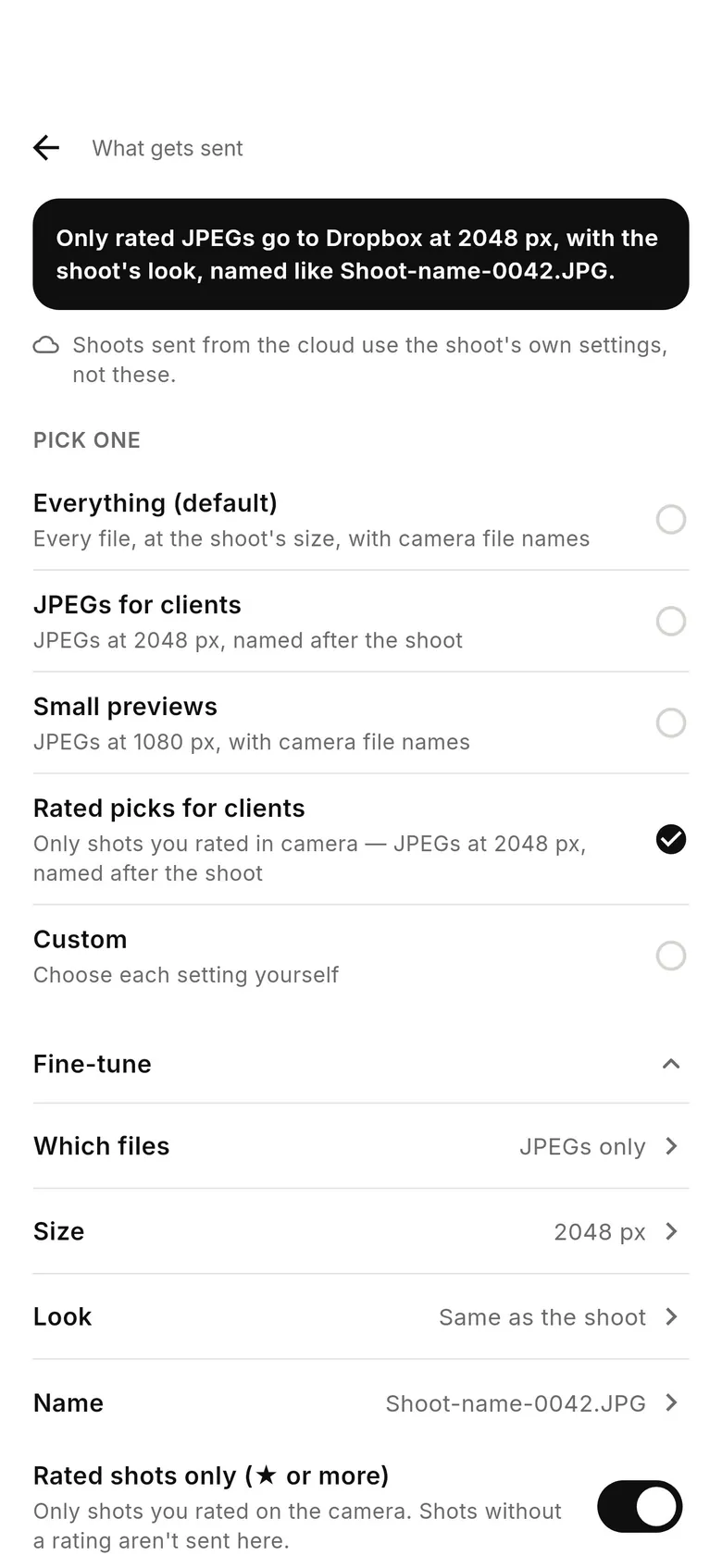
CloudTether 1.1 adds “What gets sent” for each destination: tap a service in the Deliver tab. Presets cover the common cases — “Everything (default)”, “JPEGs for clients” (JPEGs at 2048 px, named after the shoot) and “Small previews” (JPEGs at 1080 px) — and “Fine-tune” sets which files (Everything, JPEGs only or RAW only), the size, a look and the file name. One limit: services CloudTether delivers from the cloud use the shoot's own settings, and the screen says so where that applies — set size and look in the shoot's settings for those.
When to keep RAW
Send RAW when the edit happens elsewhere and soon — a retoucher or an editor working while you shoot — when the light is hard and the client will want recovered highlights, or when the off-site copy is your backup. With JPEG only on, the card holds the only copy of each RAW until you get home, so keep using a second card slot if your camera has one. For a live gallery, previews or a press desk that only takes JPEGs, leaving RAW on the camera is the right call.
Settings for common jobs
Live event gallery: JPEG only, delivery at Web (2048 px). Wedding sneak peeks plus a full backup: JPEG for the couple's gallery and RAW sent later on the venue or hotel Wi-Fi. Press filing: JPEG only to the desk's FTP or SFTP server, at the size the desk asks for. Studio, with a retoucher waiting: everything, at original size, over USB and a good connection.
FAQ
Can I shoot RAW+JPEG and send only the JPEGs?
Yes, in CloudTether 1.1. Switch on “JPEG only — leave RAW files on the camera” in the shoot's settings; RAW files stay on the card.
Does a smaller delivery size make my phone upload faster?
No. The phone uploads each shot once at full resolution and the smaller copies are made afterwards. To send less from the phone, use JPEG only.
Are RAW files ever resized?
No. Only JPEGs are resized; RAW files are always delivered full size.
Can I choose my own JPEG size and quality?
Yes, in CloudTether 1.1: shoot settings › Delivery resolution › “Custom…” sets a long edge from 800 to 8,000 px and a quality from 60 to 100.
Tether your camera to the cloud with CloudTether
Deliver every shot to the cloud or a client gallery, live as you shoot — no laptop. Start with a 7-day free trial on iPhone, iPad or Android.