Send only your best shots: rate them in camera
Cull on the back of the camera as you go: press the rating button and only the shots you starred leave the camera.
Why rate in camera instead of sending everything
At an event or a wedding you might shoot a thousand frames, but the client gallery, the press desk or the social team only want the good ones. Sending everything means someone has to cull later, and every near-duplicate costs upload time on the phone's mobile data. Most working photographers already rate or protect keepers on the camera between moments. CloudTether 1.1 turns that habit into the delivery rule: a shot leaves the camera only once you've given it a star rating.
How it works
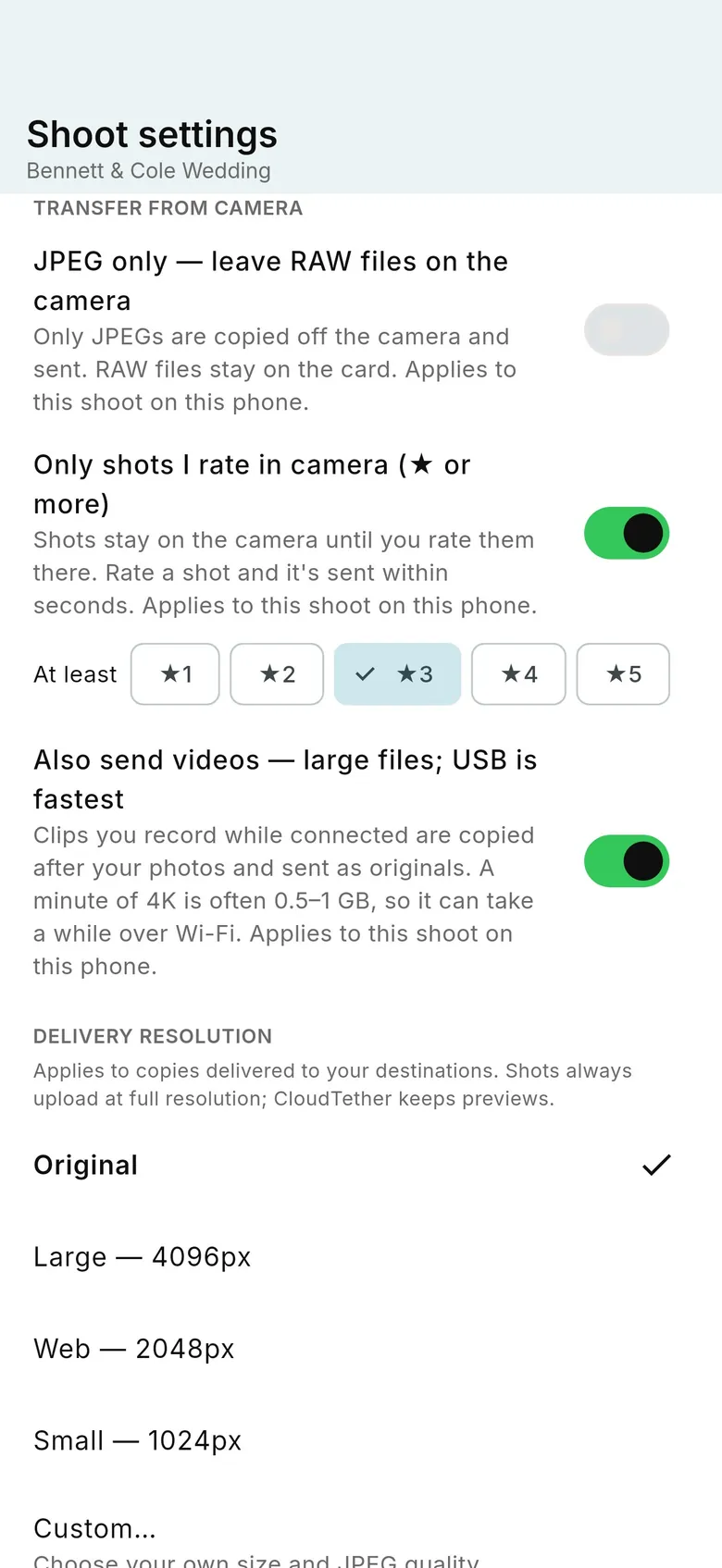
Open the shoot's settings and, under “Transfer from camera”, switch on “Only shots I rate in camera (★ or more)”. Choose the minimum with “At least”: ★1 to ★5 (★1 is the default). From then on, a new shot is not copied off the camera when you take it — it waits on the card. Rate it in playback at or above your minimum and CloudTether copies the full-resolution file off the camera and sends it to the shoot's destinations, ahead of anything else waiting to upload. A shot you never rate stays on the card and is never sent. Changing or clearing a rating after a shot has been sent does nothing, so nothing is ever sent twice. The setting belongs to that shoot on that phone; switch it off and new shots transfer straight away again (shots that were waiting stay on the card).
Where the rating comes from
Canon and Nikon cameras write the star rating into the image file itself, in the same rating field (XMP rating) that Lightroom and other photo software read. CloudTether reads that field from the file over the tether, so there's nothing extra to install on the camera. Most of the time a rated shot is on its way within a few seconds. If the camera has been sitting idle for a while, CloudTether checks less often to save battery, so it can take up to about half a minute; shooting or rating again speeds it back up. Then add the normal transfer and upload time for a full-size file.
RAW+JPEG, two cards and JPEG only
If you shoot RAW to one card and JPEG to the other, rating either file counts for the pair — rate whichever one playback shows. Combine it with “JPEG only — leave RAW files on the camera” and only the JPEG of a rated shot is sent; the RAW stays on the card, but a rating you gave the RAW still counts for its JPEG.
Shots already on the card
Shots that were on the card before you connected are never held back or sent automatically. About six seconds after a camera connects to a rated-only shoot, CloudTether looks at the newest 30 files on the card. If some are already rated, it asks once: “N rated shots on the card” — “Send them” or “Not now”. “Not now” is the default and sends nothing.
Set up a rating button on a Canon EOS R
On the EOS R5 Mark II, R6 Mark II, R7 and R8 you can rate any image in playback from the Quick Control (Q) screen. To make it one press, put Rating on a button: in the Custom Functions menu, open Customize buttons, pick a button you can reach in playback and assign Rating to it. Which buttons can take it differs between bodies, so check your camera's manual if the option isn't where you expect. For Wi-Fi, keep the camera's wireless function on Remote control (EOS Utility), as for any CloudTether Wi-Fi connection. We've checked rated send end to end on an EOS R5 Mark II; other Canon EOS bodies use the same code.
Set up a rating button on a Nikon Z
Nikon Z bodies let you rate in playback from the i menu, or put Rating on a button under the Custom Settings menu's custom controls for playback. Rated send works the same way on Nikon, but we haven't tried it on every Nikon body yet, so take a few test shots before a job.
Sony and Fujifilm
Rated send isn't available for Sony or Fujifilm cameras over the tether. In Sony's PC Remote mode the phone can't see the files on the card, and Fujifilm's tether only reports new shots, so there's no rating to read. If every camera sending to the shoot is one of these, the switch is greyed out with “Not available for this camera over tether”. In a mixed setup — say a Canon and a Sony on one phone — a note names the Sony and every shot from it is sent as normal. A shot is never dropped silently because of this switch.
Different rules for different destinations
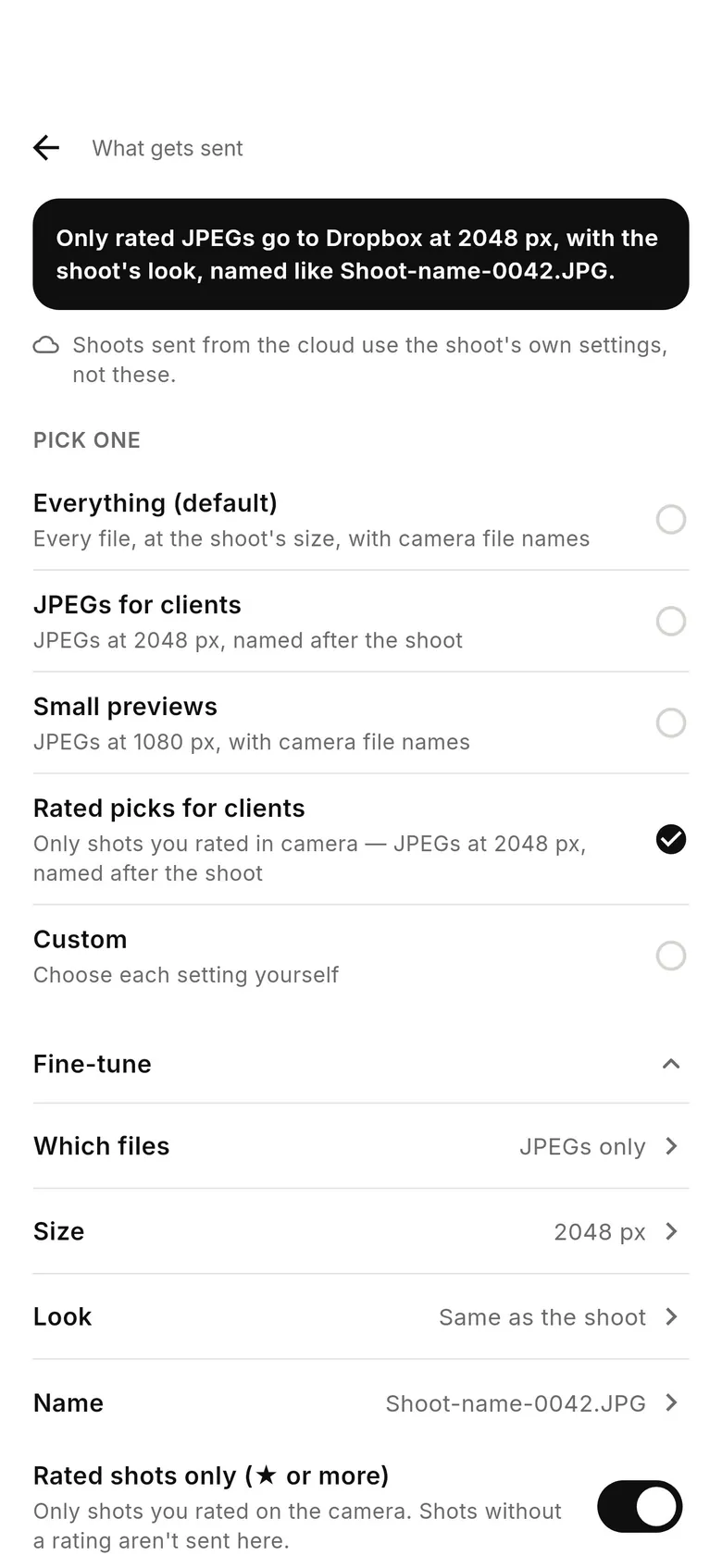
Each destination's “What gets sent” screen has a “Rated shots only (★ or more)” switch under “Fine-tune”, and a preset, “Rated picks for clients”: only rated shots, as JPEGs at 2048 px, named after the shoot. Be clear about the limits before you plan around it. The per-destination switch is on or off — any rating of ★1 or more counts — so a separate star level per destination (say everything to an editor, ★3 to the client and ★5 to social) isn't available; the star minimum is set per shoot. A shot's rating has to be in the file when it's copied off the camera, and a shot rated after it was copied isn't sent again to rated-only destinations. And services that CloudTether delivers from the cloud use the shoot's own settings; the screen tells you when that applies. In practice the reliable way to send only your picks is the shoot-level switch, and the per-destination switch is most useful for copies kept on the phone.
Patterns that work
Client gallery of picks only: make a rated-only shoot at ★1 (or ★3 if you rate more finely) pointed at the gallery, and rate as you go. Picks to the client while the editor gets everything: run the rated-only shoot for the client and give the editor the card, or import the rest later — unrated shots are still on it. Strict selects for social: a separate shoot at ★5 for the camera covering the social moments. Whatever you choose, do a dry run: take three shots, rate one, and check that only that one arrives.
FAQ
Can CloudTether send only the photos I rate on my camera?
Yes, in CloudTether 1.1. Turn on “Only shots I rate in camera” in the shoot's settings and choose a minimum of ★1 to ★5. Unrated shots stay on the card; rated ones are sent within seconds.
Which cameras support rated send?
Canon EOS and Nikon cameras, which write the star rating into the file. It's been checked on a Canon EOS R5 Mark II. It isn't available for Sony or Fujifilm over the tether; their shots are sent as normal.
What happens if I change a rating after the shot was sent?
Nothing. A shot is sent once; re-rating or clearing the rating doesn't send it again or remove it.
Can I set a different star level for each destination?
Not yet. The star minimum is per shoot. A destination can be set to rated shots only (any rating), with the limits explained above.
Tether your camera to the cloud with CloudTether
Deliver every shot to the cloud or a client gallery, live as you shoot — no laptop. Start with a 7-day free trial on iPhone, iPad or Android.