Camera connected but no photos appear on your phone
By the CloudTether team · Updated
Short answer: the link is fine, but something stops the shots qualifying or you're looking in the wrong place. Check you're taking stills, not video; that rated send or JPEG only isn't filtering everything out; that Sony's Still Img. Save Dest. is PC+Camera; and that you're looking at the shoot the camera is actually sending to.
Likely causes
- The camera in a video mode, recording clips that a shoot isn't set to send.
- Rated send on (Canon and Nikon) with no frames rated yet.
- JPEG only on while the camera shoots RAW only, so nothing qualifies.
- Sony's Still Img. Save Dest. not set to PC+Camera.
- Looking at a different shoot from the one the camera sends to, or shots going to the phone only.
- On Fujifilm, files going over the cable instead of to the card — or the reverse surprise.
How to fix it, step by step
Take a still in a stills mode
Put the dial in a stills mode and take a photo. Video clips are only sent when the shoot's “Also send videos” switch is on in 1.1, and some bodies — Sony's PC Remote among them — may not report clips at all.
Check where this camera is sending
In 1.1, Home shows each camera's route — for example “Delivers to Dropbox, Google Drive” — with a Change button; it's also on the Send its shots to… sheet when the camera connects. Make sure you're looking at that shoot. If you chose “This phone only”, shots save to the phone's library rather than the cloud.
Turn rated send off, or rate a frame
With “Only shots I rate in camera” on, only frames you rate on the camera are sent — on Canon and Nikon. Rate one in playback to test, or switch it off in the shoot's settings to send everything.
Match JPEG only to what you shoot
“JPEG only — leave RAW files on the camera” sends nothing if the camera is shooting RAW only. Switch the camera to RAW+JPEG, or turn JPEG only off.
Sony: set Still Img. Save Dest.
In the remote shooting settings, set Still Img. Save Dest. to PC+Camera, so each frame is sent and also written to the card.
Fujifilm: check where files are saved
Some Fujifilm bodies send shots over the cable instead of writing them to the card while tethered. Take a test shot and look at both the shoot and the card, so you know which copy you have.
Reconnect and take a test shot
If it still shows nothing, restart the camera and the app and reconnect. Take a test shot: “Test shot delivered” means the whole chain is working.
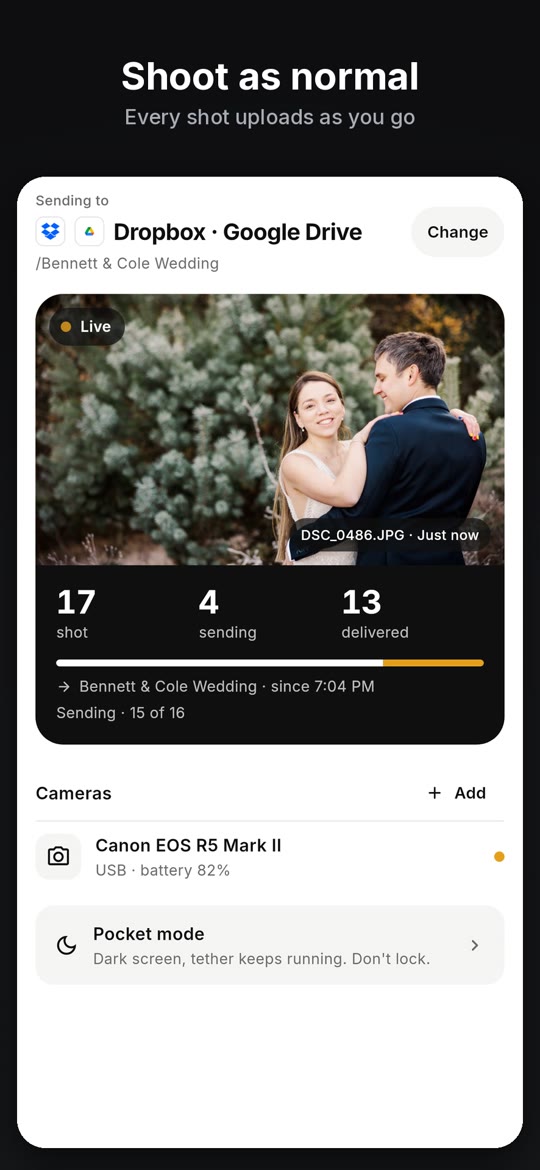
What a working tether looks like
The CloudTether app in 21 seconds: connect, choose where photos go, shoot, delivered.
Once the camera is connected, every shot comes off it and goes where you chose — no picking, no importing.
On screen: Plug in your camera: USB cable or Wi-Fi. Choose where photos go: set it once, then just shoot. Shoot as normal: every shot uploads as you go. Camera to cloud in seconds: on your phone, then delivered. Every photo, delivered: see exactly what arrived. Dropbox, Drive, ShootProof: SmugMug, Lightroom, FTP and more. Two cameras at once: Canon, Nikon, Sony, Fujifilm.Shots on the phone, but not in the cloud?
That's a different problem: the camera link is working and the upload isn't. Open the shoot to see each destination's counts, then work through our photos not uploading page — signal, data limits, a destination that needs reconnecting, or a file type that's skipped.
FAQ
Why does my camera say connected but no photos come through?
Usually a filter or a mode: video instead of stills, rated send with nothing rated, JPEG only with RAW-only shooting, or Sony's save destination. Check those, then take a test shot.
Why do only some photos transfer?
Rated send may be on, so only frames you rate are sent (Canon and Nikon). Switch it off in the shoot's settings to send everything.
Does CloudTether send video?
In 1.1, when “Also send videos” is on for the shoot. Some cameras don't report clips while tethered.
Why are my Sony shots not on the card?
Set Still Img. Save Dest. to PC+Camera in the remote shooting settings.
Where do shots go if I chose This phone only?
They save straight to the phone's photo library, with nothing uploaded to the cloud.
Tether your camera to your phone with CloudTether
Canon, Nikon, Sony and Fujifilm over USB or Wi-Fi, on iPhone, iPad and Android. Every full-resolution shot is copied off the camera and delivered to Dropbox, Google Drive, a client gallery or FTP while you keep shooting.