Nikon SnapBridge app: how it works, the settings that matter, and its limits
Short answer: SnapBridge is Nikon's free app for iPhone, iPad and Android that keeps your camera connected to your phone. It pairs over Bluetooth, sends small copies of your photos to the phone automatically, lets you download full-size originals (and NEF RAW on Wi-Fi-capable bodies) by hand, turns the phone into a remote with live view, and adds your phone's location to your pictures. It's great for sharing and convenience; it isn't built to move every full-resolution shot as you work.
What SnapBridge is
SnapBridge is the companion app for Nikon cameras with Bluetooth — most Z mirrorless bodies, recent DSLRs and many COOLPIX compacts. Where Nikon's older Wireless Mobile Utility needed you to join the camera's Wi-Fi each time, SnapBridge keeps a constant low-energy Bluetooth link in the background and only switches to Wi-Fi when it needs to move something larger. The idea is that the camera and phone stay connected without you thinking about it: photos trickle across, the clock and location stay in sync, and the phone is ready as a remote when you need one.
How SnapBridge moves photos: auto link vs downloads
There are two paths, and knowing which one you're on explains most of what SnapBridge does. Auto link sends photos in the background as you shoot, over Bluetooth with a hand-off to Wi-Fi on some bodies, but as reduced-size JPEG copies — 2 megapixels, or 8 megapixels on many recent bodies. That's ideal for posting to social media and useless for clients who need the real file. Downloading is manual: open the camera's pictures in the app over Wi-Fi, pick the ones you want and download them at original size. Since SnapBridge 2.6, NEF RAW files can be downloaded this way from Wi-Fi-capable cameras; auto link never sends RAW or video.
What else SnapBridge does
Remote photography: on cameras with Wi-Fi, the phone shows live view and fires the shutter, which is handy for group shots, self-portraits and a camera on a tripod near wildlife. Location: the phone's location can be embedded in each picture as you shoot. Clock sync: the camera's date and time follow the phone, so travel time zones sort themselves out. Firmware: on supported recent bodies, the app can download a firmware update and send it to the camera. Nikon Imaging Cloud: recent Z bodies can link to Nikon's cloud service through SnapBridge for things like picture-control downloads and firmware. Features vary by model, and Bluetooth-only bodies do less.
How to set up SnapBridge
1. Install SnapBridge and sign in or skip the optional Nikon ID. 2. Allow the permissions it asks for — Bluetooth, nearby devices or location on Android, Local Network and Photos access on iPhone. 3. On the camera, open the network or setup menu and choose Connect to smart device, then Pairing (Bluetooth). 4. In SnapBridge, tap Add camera (or the camera icon) and pick your camera when it appears. 5. Confirm the pairing code on both the camera and the phone; if you miss the camera's prompt, pairing fails quietly. 6. Choose whether to turn on auto link and location data. That's it: the camera now appears in the app, and pictures you take start arriving as small copies if auto link is on.
The settings that matter
Auto link: on for background sharing, off if you want the battery to last and only download by hand. Auto link image size: 2 MP or, on bodies that offer it, 8 MP — choose 8 MP if you share to big screens. Download size: set the manual download to the original size when you need full resolution. Send while off: on some bodies the camera can keep sending over Bluetooth after you switch it off; it's convenient but uses a little battery. Location data: on if you want every picture geotagged, off for privacy. Select to send: mark pictures on the camera to send rather than sending everything. Battery: keep the app allowed to run in the background, or transfers stop when the phone sleeps.
Which cameras use SnapBridge?
Nikon's Z mirrorless bodies — from the Z50, Z30 and Zfc to the Z6III, Z8 and Z9 — and Bluetooth-equipped DSLRs from the D3400 and D5600 era onward, including the D500, D7500, D850 and D780, plus many COOLPIX compacts. Nikon keeps the full list in SnapBridge's help pages. Some older bodies that used the Wireless Mobile Utility can also connect to SnapBridge over Wi-Fi only. Check your model for remote shooting and RAW download, because Bluetooth-only bodies don't have them.
SnapBridge's limits
Small automatic copies: auto link is 2 MP or 8 MP by design, so full-resolution files and RAW mean a manual download for each batch. Wi-Fi hand-offs: big downloads need the phone on the camera's Wi-Fi, and Nikon's own help notes iOS can end that connection during or after connecting. Speed: Bluetooth is too slow for full-size photos, and camera Wi-Fi is slower than a cable. Delivery stops at the phone: getting photos to a client, a gallery or a newsroom server is up to you. And it's Nikon only — a second body from another brand needs that maker's app. If SnapBridge itself is misbehaving, our step-by-step SnapBridge fixes guide covers pairing, permissions and dropped connections.
SnapBridge and Nikon's other apps
Nikon has several apps with overlapping names, and it helps to know which does what. SnapBridge is the phone app for Bluetooth-equipped cameras. The Wireless Mobile Utility is the older phone app for the WU-1a adapter and early built-in Wi-Fi bodies. NX Tether is free desktop software for tethered shooting to a Mac or Windows computer, with live view and camera control. NX Studio is Nikon's free desktop viewer and editor for NEF files. The Wireless Transmitter Utility pairs a camera with a computer over a network for wireless tethering. And Nikon Imaging Cloud is Nikon's online service that recent Z bodies reach through SnapBridge. For sharing from a phone, SnapBridge is the one you want; for tethered capture, it's NX Tether.
SnapBridge tips for everyday use
Pair once at home, not at the event, and pair each body separately if you own more than one; the app keeps a list of paired cameras. Leave auto link on at 8 MP for travel and social, and off for paid work where you'll download originals later. Turn on location data for travel shoots so photos show up on a map. Before a long download, keep the camera awake and the phone close, and plug the phone into power. And after any camera firmware or app update, expect to pair again — it's the most common fix.
When to use something else
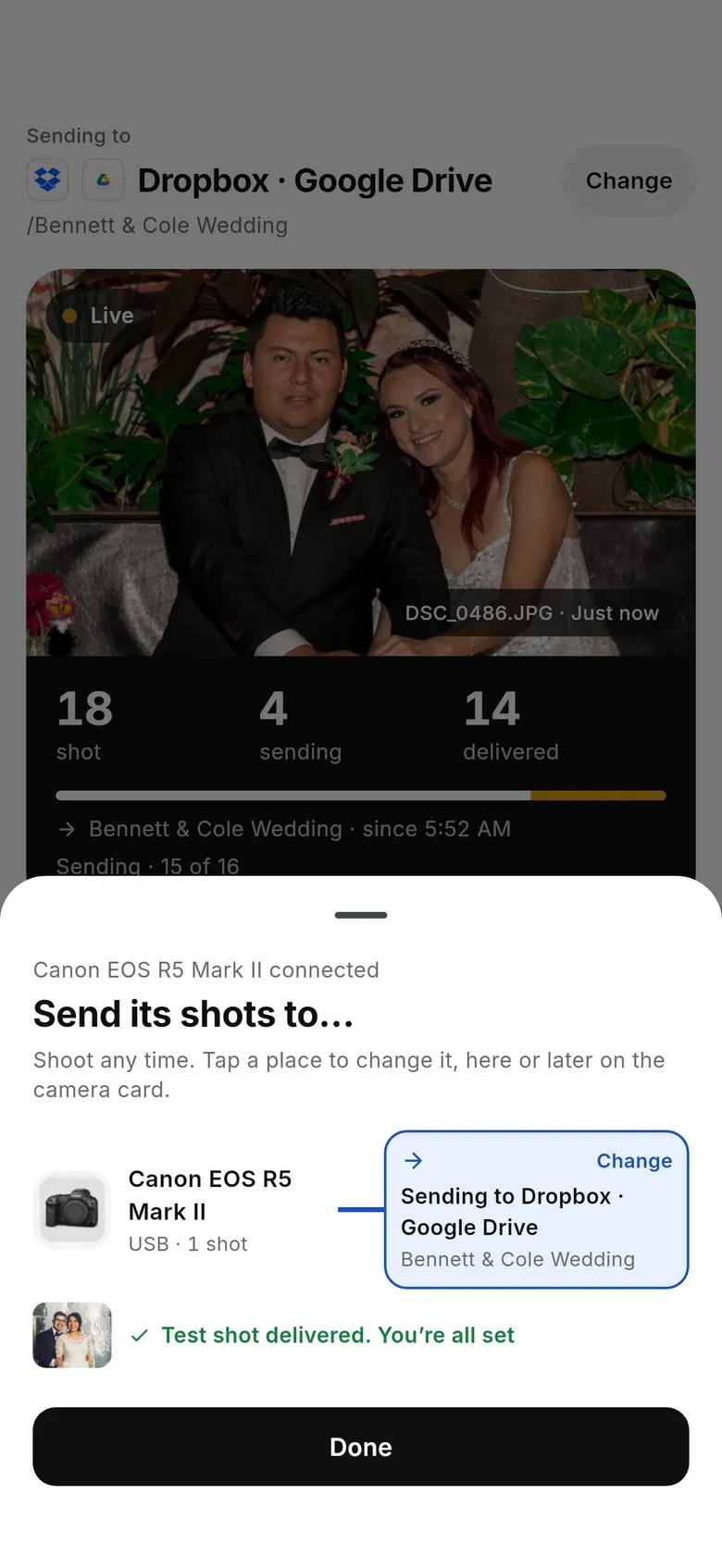
If you want every frame at full resolution — NEF or JPEG — off the camera and delivered while you shoot, use a tether instead. CloudTether connects a Nikon to an iPhone, iPad or Android phone with a USB-C cable and copies each original the moment it's written, or only the shots you rate on the camera, then sends them to Dropbox, Google Drive, a gallery or an FTP server. Nikon USB is verified on the Z6, and other Nikon bodies use the same code, so they're expected to work over USB but not yet tested by us; CloudTether's Nikon Wi-Fi isn't verified yet. It has no live view or remote shutter, so many photographers keep SnapBridge for location and remote shots and use CloudTether for delivery — just not over the same connection at once. Our SnapBridge alternative page compares the two side by side. There's a 7-day free trial.
FAQ
What is the SnapBridge app?
Nikon's free app for iPhone, iPad and Android that pairs with Nikon cameras over Bluetooth to send small photo copies automatically, download originals, shoot remotely, sync the clock and add location.
Is SnapBridge free?
Yes. SnapBridge is a free download from the App Store and Google Play.
Why does SnapBridge send 2 MP photos?
Auto link sends reduced-size copies by design — 2 MP, or 8 MP on many recent bodies. Download the original from the app over Wi-Fi when you need full resolution.
Can SnapBridge transfer RAW files?
Yes, by manual download from Wi-Fi-capable cameras since SnapBridge 2.6. Auto link doesn't send RAW or video.
Does SnapBridge use Bluetooth or Wi-Fi?
Both. Bluetooth keeps a low-power link for pairing, auto link, location and the clock; Wi-Fi carries remote live view and full-size downloads on cameras that have it.
Which Nikon cameras work with SnapBridge?
Nikon Z bodies, Bluetooth-equipped DSLRs such as the D500, D7500, D850 and D780, and many COOLPIX compacts. Nikon's SnapBridge help lists every model and its features.
Can SnapBridge update my camera's firmware?
On supported recent bodies, yes — the app can download an update and send it to the camera. Older bodies are updated from a memory card.
Is there an alternative to SnapBridge for full-resolution transfers?
Yes. CloudTether tethers a Nikon over USB and copies every full-resolution NEF or JPEG to your phone and on to the cloud as you shoot.
Tether your camera to the cloud with CloudTether
Deliver every shot to the cloud or a client gallery, live as you shoot — no laptop. Start with a 7-day free trial on iPhone, iPad or Android.