Tethered shooting pros and cons (vs shooting to a card)
Short answer: tethered shooting gives you a big-screen view of every frame, an off-camera copy seconds after the shutter and the chance to deliver while you're still shooting. The costs are set-up time, a cable or wireless link to manage, less freedom to move, more power use and one more thing that can fail. It's clearly worth it in studios and on product sets, and increasingly on location when the tether is a phone in your pocket rather than a laptop on a table. For unhurried personal work, a card is still fine.
The advantages of tethered shooting
See it bigger, sooner: focus, expression, a stray hair or a reflection on a product is obvious on a large screen and easy to miss on the camera's. You fix it while the set is still lit. A backup as you go: every frame exists off the camera seconds after it's taken, so a lost or corrupt card no longer costs the shoot. Everyone sees the same picture: a client, art director or editor watches frames arrive and gives feedback on set rather than after you've packed up. Files organised from the start: the software names, sorts and applies a preset or metadata on import. And delivery starts during the shoot: when the tether is online, each frame can go straight to a client folder, gallery or server.
The disadvantages
Set-up time: a computer tether means a table, cable runs, power and a test before the first frame. Less freedom: a cable limits how far you can move, and a laptop isn't something you carry through a wedding. Reliability: a cable can be kicked out, a port can wear, wireless can drop, and support is model by model, so a firmware or software update can break a working set-up. Speed: very fast bursts of large RAW files can back up in the camera's buffer while the transfer catches up. Power: camera and host both drain faster. And cost and kit: software licences, cables, tether tables and stands add up.
Tethered vs shooting to a card, side by side
Neither wins on every count, which is why many photographers do both — tether and keep the card recording.
| Factor | Tethered | Card only |
|---|---|---|
| Reviewing frames | Large screen, as you shoot | Camera's rear screen until import |
| Backup | Off-camera copy within seconds | One copy on one card until you import |
| Client involvement | Live, on set or remotely | After the shoot |
| Getting photos out | Can start during the shoot | Hours or days later |
| Set-up | Software, cable or Wi-Fi, a test shot | None |
| Moving around | Limited by cable; freer with Wi-Fi or a phone | Unlimited |
| Burst shooting | Large RAW bursts may queue | Limited only by the card |
| Power | Camera and host drain faster | Normal |
| What can fail | Cable, port, link, software, card | Card |
When tethering is worth it
Studio portraits, fashion and product work, where a client or art director signs off each set-up on a calibrated screen and retouching starts during the day. Catalogue and e-commerce runs, where consistent naming and a preset on import save hours. Corporate headshots, where people pick their favourite before they leave the room. Weddings and events, where a same-day gallery or social posts during the event win referrals and a live backup protects irreplaceable moments. Press and sports, where the first picture filed is the one that runs.
When to shoot to a card
Personal, travel and landscape work with no one waiting for the pictures. Fast action where you shoot long RAW bursts and the buffer matters more than an instant copy. Remote locations where you can't carry or power a host device. And any shoot where you haven't tested the tether with that exact camera and software — an untested tether on a paid job causes more stress than it saves.
The middle ground: tether and keep the card
Most cameras keep recording to the card while tethered, if you set them to. That gives you the benefits of tethering with the card as a second copy if the cable, computer or connection fails. Shoot RAW+JPEG and send only the JPEGs when speed matters; the RAW files stay on the card for the edit.
Questions to ask before you tether a shoot
Who needs to see the pictures, and when — you, a client on set, or someone elsewhere? Does the camera stay in one place, or do you move? Is your exact body supported by the software, and have you tested it since the last update? Where must the photos end up by the end of the day? And what happens if the tether fails: is the card still recording? The answers usually make the choice between a computer, a phone or no tether at all.
Cutting the cons: tethering from a phone
Most of the disadvantages come from the laptop, not the idea. Tether to a phone and the table, long cable and power strip disappear: CloudTether connects a Canon, Nikon, Sony or Fujifilm camera to an iPhone, iPad or Android phone over a short USB-C cable or the camera's Wi-Fi, copies every frame as you shoot and delivers it to the cloud or a client gallery — and if the signal drops, shots wait on the phone and upload later. What you give up is the big screen and on-set grading: it now has live view and a remote shutter, but no exposure control, so studios that need camera settings and colour on a big screen keep a computer tether.
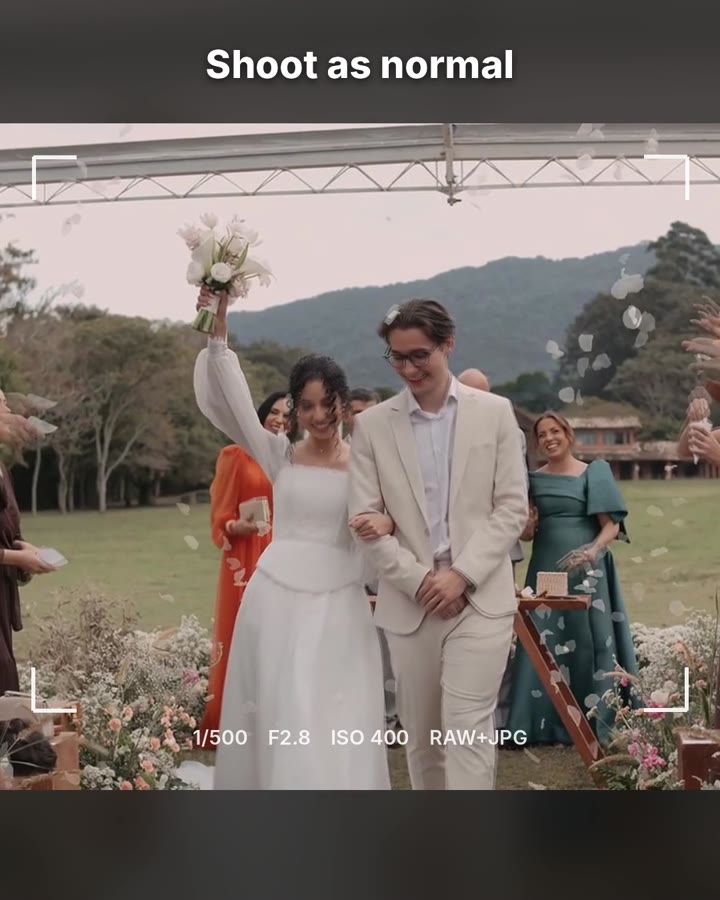
What a phone tether looks like
Your client sees the photo before you lower the camera. No laptop, no card reader.
The camera keeps recording to its card; the phone copies each frame and delivers it while you shoot.
On screen: Your client sees the photo before you lower the camera. Shoot as normal. On your phone in seconds, the moment you press the shutter. Straight to the client's gallery: Dropbox, Google Drive, Google Photos, ShootProof, SmugMug, Lightroom and FTP, plus OneDrive, Box, Frame.io, Slack, S3 and more. Works with the camera you already own: USB or camera Wi-Fi; Canon, Nikon, Sony, Fujifilm; RAW + JPEG, or JPEG only for speed. Weddings, events, sports, race photos. No laptop. No card reader.FAQ
What are the advantages of tethered shooting?
A large-screen view of every frame, an off-camera backup within seconds, live client review, files organised on import, and delivery that can start during the shoot.
What are the disadvantages of tethered shooting?
Set-up time, a cable or wireless link to manage, less freedom to move, more power use, model-by-model support, and large RAW bursts that can queue.
Is tethered shooting worth it?
For studio, product, headshot and client-facing work, yes. For weddings, events and press it's worth it when the tether is light — a phone rather than a laptop. For personal work, a card is fine.
Does tethering slow the camera down?
Not noticeably for most shooting. Very long bursts of large RAW files can wait in the buffer longer while the transfer catches up.
Do I still need a memory card when tethering?
Keep one in. Most cameras can save to the card and the tethered device, giving you a second copy.
Can I tether without a laptop?
Yes. CloudTether tethers your camera to an iPhone, iPad or Android phone over USB or Wi-Fi and delivers each shot to the cloud.
Tether your camera to the cloud with CloudTether
Deliver every shot to the cloud or a client gallery, live as you shoot — no laptop. Canon, Nikon, Sony and Fujifilm over USB or Wi-Fi, on iPhone, iPad or Android.