Best cameras for event photographers who need fast delivery
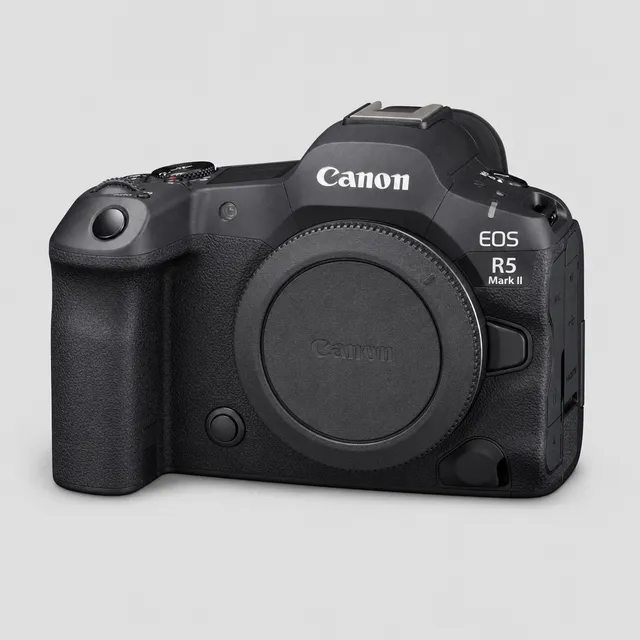
Short answer: for event photographers who deliver during the event, the Canon EOS R5 Mark II is the strongest all-rounder: dual slots, a 10Gbps USB-C port, built-in FTP, optional 2.5GbE wired networking, and it's one of the bodies we've verified with CloudTether. The Nikon Z8 is the pick for Nikon shooters, the Sony α9 III if you need built-in Ethernet, the Canon EOS R6 Mark III and Nikon Z6 III for value, the Sony α7 IV on a budget, and the Fujifilm X-H2S for APS-C with FTP through its FT-XH grip.
What actually speeds up delivery
Sensor and autofocus decide whether you get the shot. These decide how fast it reaches the client:
- Two card slots. A simultaneous backup lets you hand frames over during the event without worrying about the only copy.
- A USB-C port that tethers. Tethering to a phone or laptop copies every frame off the camera as you shoot. 10Gbps helps with big RAW files; even USB 2 is fast for JPEGs.
- Built-in FTP, ideally with FTPS or SFTP. Lets the camera send straight to an agency or client server over Wi-Fi or a network cable.
- 5 GHz Wi-Fi. Usually less congested than 2.4 GHz in a busy venue.
- Wired Ethernet. The most reliable link where the venue provides one, built in or through an adapter or grip.
The shortlist compared
| Camera | Card slots | USB-C | Built-in FTP | Wired network | CloudTether status |
|---|---|---|---|---|---|
| Canon EOS R5 Mark II | CFexpress B + UHS-II SD | 10Gbps | Yes | 2.5GBASE-T with BG-R20EP grip or CF-R20EP fan | Verified over USB, rated send checked |
| Canon EOS R6 Mark III | CFexpress B + UHS-II SD | 10Gbps | Yes, FTP and FTPS | — | Expected: same Canon code |
| Nikon Z8 | CFexpress B + UHS-II SD | 5Gbps | Yes, over Wi-Fi | Via USB adapter | Expected: same Nikon code as our Z6 |
| Nikon Z6 III | CFexpress B + UHS-II SD | 5Gbps | Yes, Wi-Fi or Ethernet | Via USB adapter | Expected: shares the Z6's USB code |
| Sony α9 III | 2 × CFexpress A / UHS-II SD | 10Gbps | Yes | Built-in 1000BASE-T | Expected over USB; Wi-Fi untested |
| Sony α7 IV | CFexpress A / SD + SD | 10Gbps | Yes | Via USB adapter | Expected over USB; Wi-Fi untested |
| Fujifilm X-H2S | CFexpress B + UHS-II SD | 10Gbps | With FT-XH grip | With FT-XH grip | Expected over USB; Wi-Fi experimental |
"Expected" means the body runs the same CloudTether code as a model we've verified on hardware, but we haven't tested that exact body; try it before a paid job.
Canon EOS R5 Mark II: the all-rounder
The R5 Mark II has a CFexpress Type B slot and a UHS-II SD slot, a USB-C port equivalent to USB 3.2 Gen 2, and 802.11ax Wi-Fi (Canon notes it excludes 6 GHz). It sends to FTP servers directly and works with Canon's Content Transfer Professional app. Add the BG-R20EP battery grip or CF-R20EP cooling fan and it gains a 2.5GBASE-T wired LAN port. It's also our benchmark body: rated send is checked end to end on it, and in our app logs its JPEGs reached the phone in a median 0.06 s over USB against 0.20 s over Wi-Fi.
Canon EOS R6 Mark III: the value Canon
Canon's late-2025 R6 Mark III moves to a CFexpress Type B plus UHS-II SD pair, with a 10Gbps USB-C port. Its manual covers automatic FTP transfer after each shot, with FTPS, automatic retries when the connection recovers, and an option to protect images once they're sent. It's newer than our test bodies but speaks the same EOS protocol, and rated send works over Canon tethering.
Nikon Z8 and Z6 III: FTP built in
The Z8 has a CFexpress Type B slot and a UHS-II SD slot, dual-band Wi-Fi with FTP upload, and separate USB-C ports for data and power, which helps on long tethered days. It has no Ethernet socket, but supports a wired network through a USB adapter. The Z6 III has the same card pairing at a lower price, and its manual covers FTP over both Wi-Fi and Ethernet, including FTPS. Both support rated send over CloudTether's Nikon tethering. On iPhone, we've seen a Nikon with a CFexpress card refuse a USB connection until the card was formatted in the camera, so test with your cards.
Sony α9 III and α7 IV: wired and value options
The α9 III is the only body here with a built-in Ethernet port (1000BASE-T), alongside dual CFexpress Type A / SD slots and built-in FTP. The α7 IV is the budget route to the same FTP feature set, with one CFexpress Type A / SD slot and one SD slot and a 10Gbps USB-C port. In CloudTether, both tether over USB in PC Remote mode; set Still Img. Save Dest. to PC+Camera so the card keeps a copy. Wireless PC Remote isn't tested by us, and rated send isn't available over Sony tethering.
Fujifilm X-H2S: APS-C speed with a grip
The X-H2S has a CFexpress Type B and a UHS-II SD slot and a 10Gbps USB-C port. Fujifilm's manual says FTP upload works when the FT-XH file transmitter grip is attached, and the grip adds wired LAN. CloudTether tethers Fujifilm bodies over USB in USB TETHER SHOOTING AUTO; Fujifilm Wi-Fi is experimental in CloudTether, so use a cable for paid work.
Do you still need a tether if the camera has FTP?
Camera FTP is excellent when someone gives you a server and the venue gives you a network. It doesn't sign in to Dropbox, Google Drive or a client gallery, and it can't reach anything when there's no Wi-Fi to join. Tethering to a phone fills those gaps: the phone uses its own mobile data and CloudTether delivers each frame to cloud storage, galleries, Slack or an FTP server at once. Use the camera compatibility checker for your exact model, and see event photography with CloudTether.
Sources
Checked on 15 November 2026. Specifications and prices change; confirm with the maker before you buy.
- EOS R5 Mark II specifications — Canon Asia
- EOS R6 Mark III product manual: transferring images to an FTP server — Canon
- Nikon Z8 review — Camera Jabber
- Nikon Z8 specifications — DPReview
- Sony a9 III specifications — DPReview
- Nikon Z6III specifications — DPReview
- Z6III Reference Guide: FTP servers, connecting via Ethernet — Nikon
- Sony a7 IV specifications — DPReview
- X-H2S Network and USB Settings manual — Fujifilm
Product names are trademarks of their owners and are used to identify products only; no affiliation or endorsement is implied.
Get every shot off the camera as you shoot
CloudTether tethers Canon, Nikon, Sony and Fujifilm cameras to an iPhone, iPad or Android phone over USB or Wi-Fi and delivers each photo to your cloud storage, galleries or FTP server while you work.